


How-To: Rescale your MAF (without pics)
 May 28, 2008, 01:01 PM
#1

 How-To: Rescale your MAF (without pics)
Well I'm in the process of switching from 94170008 to 0014 ROM and it's a pain to search and transfer all settings into the xml file. The 2-bytes, the direct and other boost control mods, Tephra's patch, etc.. I also needed to rescale the MAF and the pics from the original How To thread are MIA, and without pics that thread fails as there's no write up explaining how to do it in words.
So i figured i'd write it up real quick.
Refer to that thread as to why you'd need to even bother with this (https://www.evolutionm.net/forums/sh...ht=maf+scaling)
Basically we want the table to read in Hz, because we can log Hz and therefore we know what part of this table to make adjustments to when you have a problem with fueling. At cold idle for example. Or with fuel trims.
First open your ROM and open the "MAF scaling" table. You can see there's 2 columns of data that we need expressed in other units. You won't actually change any data, just the way it's expressed, aka scaling of units.
Now right click on "MAF scaling" and click "edit" (or CTRL-M)
You are looking at a definition table that has a top and a bottom part. The top part defines the numbers in the right column of the "MAF scaling" table.
The part on the bottom describes the left column.
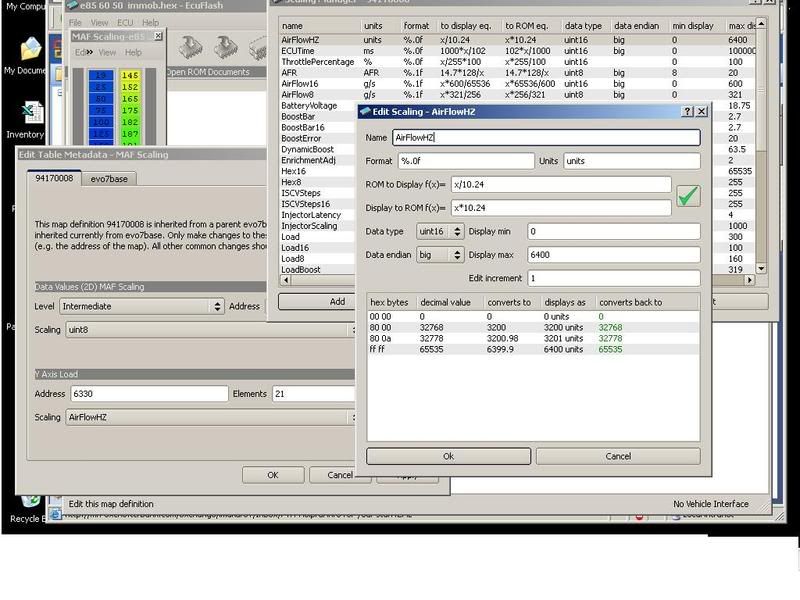
1. Change scaling of the top part (named Data Values (2D) MAF scaling) from "Airflow 8" to "unit8"
2.We need to change the scaling of the bottom part (named Y axis load) as well but first we will need to make a new definition for it. It's real simple.
2a: Click on "Scalings" button, click "Add" button on the bottom. Put something in the name, like "AirFlowHz"
In the "ROM to display f(x)=" line change "x" to "x/10.24"
In the "Display to ROM f(x)=" line change "x" to "x*10.24"
Change "data type" from "unit8" to "unit16"
Change "display max" from "255" to "6400"
Now click ok and exit out of the scaling manager and
2b: Change the scaling of the bottom part (named Y axis load) from "unit16" to the one you just defined and named "AirFlowHz" or whatever you named it.
You're done. Now go fix that idle!!!
Thanks to SophieSleeps and Eric (l2r99gst) for the original post and I hope i didn't mess anything up.
Added 06/10:
Ok, here's one pic. Here is what your table will look like after you're done rescaling it, values on the left are airflow in Hz (loggable in Mitsulogger and Evoscan), numbers on the right are the ones you will adjust in order to increase/decrease fueling at certain Hz.
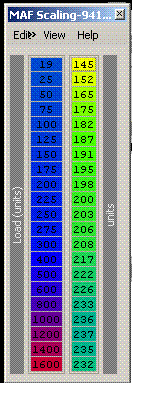
Here's how it would work for example:
You log your idle and see that your idle trims (low LTFT) are positive, let's say they are +5 in Mitsulogger. Also you look at your O2 feedback (STFT) and it's hovering around +3. It means ECU is telling you to increase fueling.
Here's what you do: You combine those numbers (+3 and +5) and get +8. This means you need to increase fueling by 8%.
Look at your log and figure out what Hz you idle at (usually around 50Hz). You have all the numbers you need.
Now look at the MAF scaling table, it has 165 in the 50Hz spot. There is a default adder ECU uses and it is 140. So you add 165 and 140 and get 305. You need to increase 305 by 8%. 305+8%=329. Then remove the adder 329-140=189. Put this 189 into 50Hz spot instead of 165.
Then you will do the same for cruise (mid LTFT), adjust those Hz numbers and in the end smooth the values in the table. Flash, log, repeat if needed.
Have fun!
So i figured i'd write it up real quick.
Refer to that thread as to why you'd need to even bother with this (https://www.evolutionm.net/forums/sh...ht=maf+scaling)
Basically we want the table to read in Hz, because we can log Hz and therefore we know what part of this table to make adjustments to when you have a problem with fueling. At cold idle for example. Or with fuel trims.
First open your ROM and open the "MAF scaling" table. You can see there's 2 columns of data that we need expressed in other units. You won't actually change any data, just the way it's expressed, aka scaling of units.
Now right click on "MAF scaling" and click "edit" (or CTRL-M)
You are looking at a definition table that has a top and a bottom part. The top part defines the numbers in the right column of the "MAF scaling" table.
The part on the bottom describes the left column.
1. Change scaling of the top part (named Data Values (2D) MAF scaling) from "Airflow 8" to "unit8"
2.We need to change the scaling of the bottom part (named Y axis load) as well but first we will need to make a new definition for it. It's real simple.
2a: Click on "Scalings" button, click "Add" button on the bottom. Put something in the name, like "AirFlowHz"
In the "ROM to display f(x)=" line change "x" to "x/10.24"
In the "Display to ROM f(x)=" line change "x" to "x*10.24"
Change "data type" from "unit8" to "unit16"
Change "display max" from "255" to "6400"
Now click ok and exit out of the scaling manager and
2b: Change the scaling of the bottom part (named Y axis load) from "unit16" to the one you just defined and named "AirFlowHz" or whatever you named it.
You're done. Now go fix that idle!!!
Thanks to SophieSleeps and Eric (l2r99gst) for the original post and I hope i didn't mess anything up.
Added 06/10:
Ok, here's one pic. Here is what your table will look like after you're done rescaling it, values on the left are airflow in Hz (loggable in Mitsulogger and Evoscan), numbers on the right are the ones you will adjust in order to increase/decrease fueling at certain Hz.
Here's how it would work for example:
You log your idle and see that your idle trims (low LTFT) are positive, let's say they are +5 in Mitsulogger. Also you look at your O2 feedback (STFT) and it's hovering around +3. It means ECU is telling you to increase fueling.
Here's what you do: You combine those numbers (+3 and +5) and get +8. This means you need to increase fueling by 8%.
Look at your log and figure out what Hz you idle at (usually around 50Hz). You have all the numbers you need.
Now look at the MAF scaling table, it has 165 in the 50Hz spot. There is a default adder ECU uses and it is 140. So you add 165 and 140 and get 305. You need to increase 305 by 8%. 305+8%=329. Then remove the adder 329-140=189. Put this 189 into 50Hz spot instead of 165.
Then you will do the same for cruise (mid LTFT), adjust those Hz numbers and in the end smooth the values in the table. Flash, log, repeat if needed.
Have fun!
Last edited by mplspilot; Jun 10, 2008 at 08:58 AM. Reason: ok, added a pic :)

 May 28, 2008, 02:46 PM
#3
Maybe it gets a bit confusing because of the word rescaling that has 2 meanings here...
Both threads just explain how to change the values used in the table. Think MPH to KMH, data doesn't change, we just rescale the speedometer.
Once that's done, you are free to actually rescale(as in change) the values in the MAF scaling table to fix idle and trim problems, which you are correct come with modifying your car. It's just that in order to do that, your table needs to have values expressed in Hz.
Both threads just explain how to change the values used in the table. Think MPH to KMH, data doesn't change, we just rescale the speedometer.
Once that's done, you are free to actually rescale(as in change) the values in the MAF scaling table to fix idle and trim problems, which you are correct come with modifying your car. It's just that in order to do that, your table needs to have values expressed in Hz.
May 28, 2008, 04:06 PM
#4

Here is the link to the original thread I made a long time ago. If you look at the spreadsheet I attached in post #54, I think it has examples of how to rescale your MAF.
https://www.evolutionm.net/forums/sh...=240323&page=4
If you feel like reading about how I got to that point, start at the first post and read away.
Eric
https://www.evolutionm.net/forums/sh...=240323&page=4
If you feel like reading about how I got to that point, start at the first post and read away.
Eric
 Jul 19, 2008, 02:58 AM
#7


EDIT: So I went to change the scaling and it's coming out completely wrong. I followed each step and went back and did it again just to make sure, but the table came out completely wrong.
The column on the right is the same, but the one on the left is completely jacked. Looks like this:
4800
0
0
0
0
0
1
1
1
1
1
1
1
2
2
2
3
4
5
5
6
Any ideas?
The column on the right is the same, but the one on the left is completely jacked. Looks like this:
4800
0
0
0
0
0
1
1
1
1
1
1
1
2
2
2
3
4
5
5
6
Any ideas?
Last edited by bboypuertoroc; Jul 22, 2008 at 02:43 AM.
Trending Topics
 Aug 19, 2008, 01:33 PM
#14
Got a few questions about scaling for mid LTFT...
I logged for four "cycles" (not sure if that's the proper term) last night and got the following for my mid LTFT:
1st cycle - 7.7487
2nd cycle - 7.7487
3rd cycle - 10.298
4th cycle - 9.3175
I tried my hardest to keep the TPS the same for the whole trip. It stayed mostly at 23% but got up to 26% a few times due to road conditions (not sure if this has an effect).
Which of the above numbers do I use to scale with? The most common, the highest, the average? Also, do I need to scale low LTFT before mid or does it matter? Also, when I actually get to the scaling part, do I use the average O2 trim for whatever Hz I'm scaling or the highest available for that Hz?
Tony (is extremely confused, but eager to learn)
I logged for four "cycles" (not sure if that's the proper term) last night and got the following for my mid LTFT:
1st cycle - 7.7487
2nd cycle - 7.7487
3rd cycle - 10.298
4th cycle - 9.3175
I tried my hardest to keep the TPS the same for the whole trip. It stayed mostly at 23% but got up to 26% a few times due to road conditions (not sure if this has an effect).
Which of the above numbers do I use to scale with? The most common, the highest, the average? Also, do I need to scale low LTFT before mid or does it matter? Also, when I actually get to the scaling part, do I use the average O2 trim for whatever Hz I'm scaling or the highest available for that Hz?
Tony (is extremely confused, but eager to learn)
Aug 19, 2008, 01:42 PM
#15
Evolving Member

TPS is not as important as airflow ... that is what you want to keep steady. Not sure what the cycle has to do with it, but in general I would start by tweaking your MAF Scaling in the 100-500 range by about 8% ... of course that is a bit of a misnomer since you want to make the overall curve smooth without any massive kinks in it. That means also tweaking the table in the 19-75 range as well as over 500.