


how-to: ECU-based direct boost control
 Sep 6, 2007, 11:04 PM
#1

how-to: ECU-based direct boost control
Updates
Sept 18, 2011: Added instructions for JDM Evo VIII 96260009 ROM.
Aug 14, 2009: 1) These instructions and endian settings are now written to work only with ECUFlash 1.31+. Instructions for older versions of ECUFlash have been deleted. 2) I have included the scalings needed to setup direct boost control using an OMNI 4-bar MAP sensor. 3) I have updated the tables names to reflect the latest understanding of the boost control system.
May 23, 2008: Some additional boost tuning tables can be found here.
Mar 20, 2008: Added instructions for USDM Evo VIII 94170014 and 94170015 ROMs.
Dec 18, 2007: Added instructions on how to perform these mods with ECUFlash v1.31+.
Sept 29, 2007: Fixed an error in the 96940011.xml instructions. I had written "MUT8A" in the entry that should be listed as "MUT8B". To fix the error in your 96940011.xml file, change the second incidence of the word "MUT8A" to "MUT8B". I think most people probably realized the mistake as the came across it.
Sept 28, 2007: Added a detailed description in the third post on how the boost control system works and how to effectively tune any boost curve possible within the limits of the turbo and WG setup.
Sept 16, 2007: Added instructions in second post for Evo VIII 96420007 and 96420008.
Sept 15, 2007: Added instructions for Evo VIII 94170008 ROM. Had to break up the instructions into three posts due to limits on the size of posts. 88590015 and 96940011 are in this post. 94170008 is in the second post. Moved EvoScan setup and tuning recommendations to the third post.
Sept 14, 2007: Made a small change to one of the scaling definitions to fix an issue where that definition was being applied to the TBEC table. Please recopy the revised "Boost Error Correction" table entry into the xml file for your ROM, and then copy the revised "BoostError" scaling entry into the "base" xml file for your ROM.
ECU-based Direct Boost Control for the Evo
Currently supported ROMs
88590015 (this post)
96940011 (this post)
96420008 (second post)
96420007 (second post)
94170015 (second post)
94170014 (second post)
94170008 (second post)
96260009 (second post)
Background
This is a "how-to" on modifying your ROM to allow ECU-based direct boost control. This boost control system works exactly in the same way as stock except that:
1) The ECU controls boost directly rather than load.
2) There is now a 1-D table that controls how often the ECU checks/adjusts the boost.
The system works as follows
1) A JDM MAP sensor is needed for boost measurement/control.
2) Different restrictor pills or a bleeder are needed to achieve more boost than stock.
3) The system keys off of absolute pressure rather than gauge pressure. This maybe confusing, but there is no way around it.
4) Instead of BDEL, BCLO, and TBEC tables, there are now "Baseline Boost", "Boost Adder", and "Boost Error Correction" tables. These tables are in psia.
Caveats
The stock boost control system was designed to have an operational upper limit on WGDC (100%) that would prevent boost overshoot. Using this system with modified restrictor pills removes that limitation, and improper tuning of the system can lead to strong boost overshoot conditions. I am not responsible if you blow up your motor.
Performing the ROM and logging mods
Several definitions and scalings need to be added to the ECUFlash XML file and the "base" XML file for your ROM. After those definitions are added, then its necessary to open your ROM in ECUFlash and perform some changes to some of the new items. After that, its necessary to add a new entry into your EvoScan data.xml file. If you are not comfortable doing these mods, it may be best to have someone do it for you.
Detailed ROM and EvoScan mods
A JDM MAP sensor or an OMNI 4-bar MAP sensor needs to be installed.
Instructions for installing the JDM MAP sensor are in this thread.
Instructions for installing the OMNI 4-bar MAP sensor are in this thread.
After the MAP sensor is installed and working, perform the mods described below. These instructions cover required modifications to ECUFlash XML files, your EvoScan "Data.xml" file, and your ROM file. I've got most of the ROMs covered. I'll add more ROMs as I have time, and if anyone works out the tables for a ROM I haven't posted yet, let me know, and I'll add the tables for that ROM to this post.
USDM Evo IX 88590015
Add the following lines to your ROM XML file:
----- (don't add the "-----")
<table name="Variable for Boost Control" category="Turbo" address="41E12" type="1D" level="1" scaling="Hex16"/>
<table name="SHLR->SHLL for EBC" category="Turbo" address="41B84" type="1D" level="1" scaling="Hex16"/>
<table name="Boost Error RAM Address" category="Turbo" address="41E06" type="1D" level="1" scaling="Hex16"/>
<table name="Boost Error RAM Address in Load Error Table" category="Turbo" address="7254" type="1D" level="1" scaling="Hex16"/>
<table name="WGDC Correction Interval #1 (High Gear Range)" category="Turbo" address="1654" type="1D" level="1" scaling="uint16"/>
<table name="WGDC Correction Interval #2 (Low Gear Range)" category="Turbo" address="1656" type="1D" level="1" scaling="uint16"/>
<table name="Boost Error Correction" category="Turbo" address="3f20" type="2D" level="1" scaling="OffsetWGDC">
<table name="Boost Error" elements="17" type="Y Axis" address="7258" elements="17" scaling="BoostErrorPsi"/>
</table>
<table name="Boost Adder" category="Turbo" address="1670" type="1D" level="1" scaling="psia16"/>
<table name="Base Boost (High Gear Range)" category="Turbo" address="3f80" type="2D" level="1" scaling="psia8">
<table name="RPM" address="722e" elements="16" type="Y Axis" scaling="RPM"/>
</table>
<table name="Base Boost (Low Gear Range)" category="Turbo" address="3fb2" type="2D" level="1" scaling="psia8">
<table name="RPM" address="722e" elements="16" type="Y Axis" scaling="RPM"/>
</table>
<table name="MUT8A Use for Boost Error" category="MUT" address="3F0AE" type="1D" level="1" scaling="Hex16"/>
<table name="MUT8B Use for WGDC Correction" category="MUT" address="3F0B2" type="1D" level="1" scaling="Hex16"/>
-----
Below are scalings that need to be added to your ECUFlash 88590015.xml file. There are two sets of scalings. One set is for the JDM 3-bar, and the other is for the OMNI 4-bar. USE ONLY THE SCALINGS FOR YOUR SENSOR.
JDM 3-bar only
----- (don't add the "-----")
<scaling name="BoostErrorPsi" units="psi" toexpr="(x-128)/(8*5.18)" frexpr="x*8*5.18+128" format="%.1f" min="-3.1" max="3.1" inc="0.1" storagetype="uint16" endian="big"/>
<scaling name="OffsetWGDC" units="WGDC Change" toexpr="(x-128)/2" frexpr="x*2+128" format="%.1f" min="-64" max="63.5" inc="0.5" storagetype="uint8" endian="big"/>
<scaling name="psia8" units="psia" toexpr="x/(5.18*2)" frexpr="x*(2*5.18)" format="%.1f" min="0" max="24.6" inc="0.1" storagetype="uint8" endian="big"/>
<scaling name="psia16" units="psia" toexpr="x/(5.18*2)" frexpr="x*(2*5.18)" format="%.1f" min="0" max="32" inc="0.1" storagetype="uint16" endian="big"/>
-----
OMNI 4-bar only
----- (don't add the "-----")
<scaling name="BoostErrorPsi" units="psi" toexpr="(x-128)/(8*4.23)" frexpr="x*8*4.23+128" format="%.1f" min="-3.8" max="3.8" inc="0.1" storagetype="uint16" endian="big"/>
<scaling name="OffsetWGDC" units="WGDC Change" toexpr="(x-128)/2" frexpr="x*2+128" format="%.1f" min="-64" max="63.5" inc="0.5" storagetype="uint8" endian="big"/>
<scaling name="psia16" units="psia" toexpr="x/(4.23*2)" frexpr="x*(2*4.23)" format="%.1f" min="0" max="32" inc="0.1" storagetype="uint16" endian="big"/>
<scaling name="psia8" units="psia" toexpr="x/(4.23*2)" frexpr="x*(2*4.23)" format="%.1f" min="0" max="30.1" inc="0.1" storagetype="uint8" endian="big"/>
-----
Instructions for ECUFlash
Variable for boost control: Stock will read 6B48. Change it to 6AEC. The table is in hex format, so you will have to enter it as 0x6AEC.
SHLR->SHLL for EBC: Stock will read 4A01. Change it to 4A00 (enter it as 0x....)
The "Boost Error RAM Address" and "Boost Error RAM Address in Boost Error Table" will both read: 69CA. Change both to 6EE2 (enter it as 0x....)
WGDC Correction Interval: Use table #1. Table #2 is for when the vehicle speed exceeds the boost limiting speed. Set the value anywhere from 1 to 10. Each unit is approx 0.08 to 0.1 sec. I recommend using a value somewhere between 1 and 5.
Boost Error Correction: This is equivalent to the TBEC table. Use the values I list below as a starting point. The upper right value should be set to zero, otherwise, significant boost overshoot may occur.
Boost Adder: This is equivalent to the BCLO table. The units are psi. As a first step. I recommend setting it to your local atmospheric pressure. This will simplify tuning.
Baseline Boost tables: These are equivalent to the BDEL tables. Max possible value is 24.6 psi.
Change MUT8A will read 6ACD. Change it to 6EE3 (enter it as 0x....)
Change MUT8B will read 6B41. Change it to 6EE9 (enter it as 0x....)
Save the ROM file and upload it to your ECU. Then go to the instructions in the third post for setting up EvoScan and tuning the system.
USDM Evo VIII 96940011
Add the following lines to your ROM file:
----- (don't add the "-----")
<table name="Variable for Boost Control" category="Turbo" address="204ba" type="1D" level="1" scaling="Hex16"/>
<table name="SHLR->SHLL for EBC" category="Turbo" address="20232" type="1D" level="1" scaling="Hex16"/>
<table name="Boost Error RAM Addr" category="Turbo" address="204ae" type="1D" level="1" scaling="Hex16"/>
<table name="Boost Error RAM Addr in Boost Error Table" category="Turbo" address="5fd2" type="1D" level="1" scaling="Hex16"/>
<table name="WGDC Correction Interval #1 (High Gear Range)" category="Turbo" address="1654" type="1D" level="1" scaling="uint16"/>
<table name="WGDC Correction Interval #2 (Low Gear Range)" category="Turbo" address="1656" type="1D" level="1" scaling="uint16"/>
<table name="Boost Error Correction" category="Turbo" address="3b24" type="2D" level="1" scaling="OffsetWGDC">
<table name="Boost Error" elements="17" type="Y Axis" address="5fd6" elements="17" scaling="BoostErrorPsi"/>
</table>
<table name="Boost Adder" category="Turbo" address="1670" type="1D" level="1" scaling="psia16"/>
<table name="Base Boost (High Gear Range)" category="Turbo" address="3b84" type="2D" level="1" scaling="psia8">
<table name="RPM" address="5fac" elements="16" type="Y Axis" scaling="RPM"/>
</table>
<table name="Base Boost (Low Gear Range)" category="Turbo" address="3bb6" type="2D" level="1" scaling="psia8">
<table name="RPM" address="5fac" elements="16" type="Y Axis" scaling="RPM"/>
</table>
<table name="MUT8A Use for Boost Error" category="MUT" address="3F53E" type="1D" level="1" scaling="Hex16"/>
<table name="MUT8B Use for WGDC Correction" category="MUT" address="3F542" type="1D" level="1" scaling="Hex16"/>
-----
Below are scalings that need to be added to your ECUFlash 96940011.xml file. There are two sets of scalings. One set is for the JDM 3-bar, and the other is for the OMNI 4-bar. USE ONLY THE SCALINGS FOR YOUR SENSOR.
JDM 3-bar only
----- (don't add the "-----")
<scaling name="BoostErrorPsi" units="psi" toexpr="(x-128)/(8*5.18)" frexpr="x*8*5.18+128" format="%.1f" min="-3.1" max="3.1" inc="0.1" storagetype="uint16" endian="big"/>
<scaling name="OffsetWGDC" units="WGDC Change" toexpr="(x-128)/2" frexpr="x*2+128" format="%.1f" min="-64" max="63.5" inc="0.5" storagetype="uint8" endian="big"/>
<scaling name="psia8" units="psia" toexpr="x/(5.18*2)" frexpr="x*(2*5.18)" format="%.1f" min="0" max="24.6" inc="0.1" storagetype="uint8" endian="big"/>
<scaling name="psia16" units="psia" toexpr="x/(5.18*2)" frexpr="x*(2*5.18)" format="%.1f" min="0" max="32" inc="0.1" storagetype="uint16" endian="big"/>
-----
OMNI 4-bar only
----- (don't add the "-----")
<scaling name="BoostErrorPsi" units="psi" toexpr="(x-128)/(8*4.23)" frexpr="x*8*4.23+128" format="%.1f" min="-3.8" max="3.8" inc="0.1" storagetype="uint16" endian="big"/>
<scaling name="OffsetWGDC" units="WGDC Change" toexpr="(x-128)/2" frexpr="x*2+128" format="%.1f" min="-64" max="63.5" inc="0.5" storagetype="uint8" endian="big"/>
<scaling name="psia16" units="psia" toexpr="x/(4.23*2)" frexpr="x*(2*4.23)" format="%.1f" min="0" max="32" inc="0.1" storagetype="uint16" endian="big"/>
<scaling name="psia8" units="psia" toexpr="x/(4.23*2)" frexpr="x*(2*4.23)" format="%.1f" min="0" max="30.1" inc="0.1" storagetype="uint8" endian="big"/>
-----
Instructions for ECUFlash
Variable for boost control: Stock will read 89A0. Change it to 8946. The table is in hex format, so you will have to enter it as 0x8946
SHLR->SHLL for EBC: Stock will read 4A01. Change it to 4A00 (enter it as 0x....)
The "Boost Error RAM Address" and "Boost Error RAM Address in Boost Error Table" will both read: 887A. Change both to 802A (again, you'll need to enter it as 0x....)
WGDC Correction Interval: Use table #1. Table #2 is for when the vehicle speed exceeds the boost limiting speed. Set the value anywhere from 2 to 10. Each unit is approx 0.08 to 0.1 sec. I recommend using a value of 1 to 5.
Boost Error Correction: This is equivalent to the TBEC table. Use the values I list below as a starting point. The upper right value should be set to zero, otherwise, significant boost overshoot may occur.
Boost Adder: This is equivalent to the BCLO table. The units are psi. As a first step. I recommend setting it to your local atmospheric pressure.
Baseline Boost tables: These are equivalent to the BDEL tables. Max possible value is 24.6 psi.
Change MUT8A will read 8927. Change it to 802B (again enter it as 0x....)
Change MUT8B will read 8DAB. Change it to 8D2D (again enter it as 0x....)
Save the ROM file and upload it to your ECU. Then go to the instructions in the third post for setting up EvoScan and tuning the system.
Sept 18, 2011: Added instructions for JDM Evo VIII 96260009 ROM.
Aug 14, 2009: 1) These instructions and endian settings are now written to work only with ECUFlash 1.31+. Instructions for older versions of ECUFlash have been deleted. 2) I have included the scalings needed to setup direct boost control using an OMNI 4-bar MAP sensor. 3) I have updated the tables names to reflect the latest understanding of the boost control system.
May 23, 2008: Some additional boost tuning tables can be found here.
Mar 20, 2008: Added instructions for USDM Evo VIII 94170014 and 94170015 ROMs.
Dec 18, 2007: Added instructions on how to perform these mods with ECUFlash v1.31+.
Sept 29, 2007: Fixed an error in the 96940011.xml instructions. I had written "MUT8A" in the entry that should be listed as "MUT8B". To fix the error in your 96940011.xml file, change the second incidence of the word "MUT8A" to "MUT8B". I think most people probably realized the mistake as the came across it.
Sept 28, 2007: Added a detailed description in the third post on how the boost control system works and how to effectively tune any boost curve possible within the limits of the turbo and WG setup.
Sept 16, 2007: Added instructions in second post for Evo VIII 96420007 and 96420008.
Sept 15, 2007: Added instructions for Evo VIII 94170008 ROM. Had to break up the instructions into three posts due to limits on the size of posts. 88590015 and 96940011 are in this post. 94170008 is in the second post. Moved EvoScan setup and tuning recommendations to the third post.
Sept 14, 2007: Made a small change to one of the scaling definitions to fix an issue where that definition was being applied to the TBEC table. Please recopy the revised "Boost Error Correction" table entry into the xml file for your ROM, and then copy the revised "BoostError" scaling entry into the "base" xml file for your ROM.
ECU-based Direct Boost Control for the Evo
Currently supported ROMs
88590015 (this post)
96940011 (this post)
96420008 (second post)
96420007 (second post)
94170015 (second post)
94170014 (second post)
94170008 (second post)
96260009 (second post)
Background
This is a "how-to" on modifying your ROM to allow ECU-based direct boost control. This boost control system works exactly in the same way as stock except that:
1) The ECU controls boost directly rather than load.
2) There is now a 1-D table that controls how often the ECU checks/adjusts the boost.
The system works as follows
1) A JDM MAP sensor is needed for boost measurement/control.
2) Different restrictor pills or a bleeder are needed to achieve more boost than stock.
3) The system keys off of absolute pressure rather than gauge pressure. This maybe confusing, but there is no way around it.
4) Instead of BDEL, BCLO, and TBEC tables, there are now "Baseline Boost", "Boost Adder", and "Boost Error Correction" tables. These tables are in psia.
Caveats
The stock boost control system was designed to have an operational upper limit on WGDC (100%) that would prevent boost overshoot. Using this system with modified restrictor pills removes that limitation, and improper tuning of the system can lead to strong boost overshoot conditions. I am not responsible if you blow up your motor.
Performing the ROM and logging mods
Several definitions and scalings need to be added to the ECUFlash XML file and the "base" XML file for your ROM. After those definitions are added, then its necessary to open your ROM in ECUFlash and perform some changes to some of the new items. After that, its necessary to add a new entry into your EvoScan data.xml file. If you are not comfortable doing these mods, it may be best to have someone do it for you.
Detailed ROM and EvoScan mods
A JDM MAP sensor or an OMNI 4-bar MAP sensor needs to be installed.
Instructions for installing the JDM MAP sensor are in this thread.
Instructions for installing the OMNI 4-bar MAP sensor are in this thread.
After the MAP sensor is installed and working, perform the mods described below. These instructions cover required modifications to ECUFlash XML files, your EvoScan "Data.xml" file, and your ROM file. I've got most of the ROMs covered. I'll add more ROMs as I have time, and if anyone works out the tables for a ROM I haven't posted yet, let me know, and I'll add the tables for that ROM to this post.
USDM Evo IX 88590015
Add the following lines to your ROM XML file:
----- (don't add the "-----")
<table name="Variable for Boost Control" category="Turbo" address="41E12" type="1D" level="1" scaling="Hex16"/>
<table name="SHLR->SHLL for EBC" category="Turbo" address="41B84" type="1D" level="1" scaling="Hex16"/>
<table name="Boost Error RAM Address" category="Turbo" address="41E06" type="1D" level="1" scaling="Hex16"/>
<table name="Boost Error RAM Address in Load Error Table" category="Turbo" address="7254" type="1D" level="1" scaling="Hex16"/>
<table name="WGDC Correction Interval #1 (High Gear Range)" category="Turbo" address="1654" type="1D" level="1" scaling="uint16"/>
<table name="WGDC Correction Interval #2 (Low Gear Range)" category="Turbo" address="1656" type="1D" level="1" scaling="uint16"/>
<table name="Boost Error Correction" category="Turbo" address="3f20" type="2D" level="1" scaling="OffsetWGDC">
<table name="Boost Error" elements="17" type="Y Axis" address="7258" elements="17" scaling="BoostErrorPsi"/>
</table>
<table name="Boost Adder" category="Turbo" address="1670" type="1D" level="1" scaling="psia16"/>
<table name="Base Boost (High Gear Range)" category="Turbo" address="3f80" type="2D" level="1" scaling="psia8">
<table name="RPM" address="722e" elements="16" type="Y Axis" scaling="RPM"/>
</table>
<table name="Base Boost (Low Gear Range)" category="Turbo" address="3fb2" type="2D" level="1" scaling="psia8">
<table name="RPM" address="722e" elements="16" type="Y Axis" scaling="RPM"/>
</table>
<table name="MUT8A Use for Boost Error" category="MUT" address="3F0AE" type="1D" level="1" scaling="Hex16"/>
<table name="MUT8B Use for WGDC Correction" category="MUT" address="3F0B2" type="1D" level="1" scaling="Hex16"/>
-----
Below are scalings that need to be added to your ECUFlash 88590015.xml file. There are two sets of scalings. One set is for the JDM 3-bar, and the other is for the OMNI 4-bar. USE ONLY THE SCALINGS FOR YOUR SENSOR.
JDM 3-bar only
----- (don't add the "-----")
<scaling name="BoostErrorPsi" units="psi" toexpr="(x-128)/(8*5.18)" frexpr="x*8*5.18+128" format="%.1f" min="-3.1" max="3.1" inc="0.1" storagetype="uint16" endian="big"/>
<scaling name="OffsetWGDC" units="WGDC Change" toexpr="(x-128)/2" frexpr="x*2+128" format="%.1f" min="-64" max="63.5" inc="0.5" storagetype="uint8" endian="big"/>
<scaling name="psia8" units="psia" toexpr="x/(5.18*2)" frexpr="x*(2*5.18)" format="%.1f" min="0" max="24.6" inc="0.1" storagetype="uint8" endian="big"/>
<scaling name="psia16" units="psia" toexpr="x/(5.18*2)" frexpr="x*(2*5.18)" format="%.1f" min="0" max="32" inc="0.1" storagetype="uint16" endian="big"/>
-----
OMNI 4-bar only
----- (don't add the "-----")
<scaling name="BoostErrorPsi" units="psi" toexpr="(x-128)/(8*4.23)" frexpr="x*8*4.23+128" format="%.1f" min="-3.8" max="3.8" inc="0.1" storagetype="uint16" endian="big"/>
<scaling name="OffsetWGDC" units="WGDC Change" toexpr="(x-128)/2" frexpr="x*2+128" format="%.1f" min="-64" max="63.5" inc="0.5" storagetype="uint8" endian="big"/>
<scaling name="psia16" units="psia" toexpr="x/(4.23*2)" frexpr="x*(2*4.23)" format="%.1f" min="0" max="32" inc="0.1" storagetype="uint16" endian="big"/>
<scaling name="psia8" units="psia" toexpr="x/(4.23*2)" frexpr="x*(2*4.23)" format="%.1f" min="0" max="30.1" inc="0.1" storagetype="uint8" endian="big"/>
-----
Instructions for ECUFlash
Variable for boost control: Stock will read 6B48. Change it to 6AEC. The table is in hex format, so you will have to enter it as 0x6AEC.
SHLR->SHLL for EBC: Stock will read 4A01. Change it to 4A00 (enter it as 0x....)
The "Boost Error RAM Address" and "Boost Error RAM Address in Boost Error Table" will both read: 69CA. Change both to 6EE2 (enter it as 0x....)
WGDC Correction Interval: Use table #1. Table #2 is for when the vehicle speed exceeds the boost limiting speed. Set the value anywhere from 1 to 10. Each unit is approx 0.08 to 0.1 sec. I recommend using a value somewhere between 1 and 5.
Boost Error Correction: This is equivalent to the TBEC table. Use the values I list below as a starting point. The upper right value should be set to zero, otherwise, significant boost overshoot may occur.
Boost Adder: This is equivalent to the BCLO table. The units are psi. As a first step. I recommend setting it to your local atmospheric pressure. This will simplify tuning.
Baseline Boost tables: These are equivalent to the BDEL tables. Max possible value is 24.6 psi.
Change MUT8A will read 6ACD. Change it to 6EE3 (enter it as 0x....)
Change MUT8B will read 6B41. Change it to 6EE9 (enter it as 0x....)
Save the ROM file and upload it to your ECU. Then go to the instructions in the third post for setting up EvoScan and tuning the system.
USDM Evo VIII 96940011
Add the following lines to your ROM file:
----- (don't add the "-----")
<table name="Variable for Boost Control" category="Turbo" address="204ba" type="1D" level="1" scaling="Hex16"/>
<table name="SHLR->SHLL for EBC" category="Turbo" address="20232" type="1D" level="1" scaling="Hex16"/>
<table name="Boost Error RAM Addr" category="Turbo" address="204ae" type="1D" level="1" scaling="Hex16"/>
<table name="Boost Error RAM Addr in Boost Error Table" category="Turbo" address="5fd2" type="1D" level="1" scaling="Hex16"/>
<table name="WGDC Correction Interval #1 (High Gear Range)" category="Turbo" address="1654" type="1D" level="1" scaling="uint16"/>
<table name="WGDC Correction Interval #2 (Low Gear Range)" category="Turbo" address="1656" type="1D" level="1" scaling="uint16"/>
<table name="Boost Error Correction" category="Turbo" address="3b24" type="2D" level="1" scaling="OffsetWGDC">
<table name="Boost Error" elements="17" type="Y Axis" address="5fd6" elements="17" scaling="BoostErrorPsi"/>
</table>
<table name="Boost Adder" category="Turbo" address="1670" type="1D" level="1" scaling="psia16"/>
<table name="Base Boost (High Gear Range)" category="Turbo" address="3b84" type="2D" level="1" scaling="psia8">
<table name="RPM" address="5fac" elements="16" type="Y Axis" scaling="RPM"/>
</table>
<table name="Base Boost (Low Gear Range)" category="Turbo" address="3bb6" type="2D" level="1" scaling="psia8">
<table name="RPM" address="5fac" elements="16" type="Y Axis" scaling="RPM"/>
</table>
<table name="MUT8A Use for Boost Error" category="MUT" address="3F53E" type="1D" level="1" scaling="Hex16"/>
<table name="MUT8B Use for WGDC Correction" category="MUT" address="3F542" type="1D" level="1" scaling="Hex16"/>
-----
Below are scalings that need to be added to your ECUFlash 96940011.xml file. There are two sets of scalings. One set is for the JDM 3-bar, and the other is for the OMNI 4-bar. USE ONLY THE SCALINGS FOR YOUR SENSOR.
JDM 3-bar only
----- (don't add the "-----")
<scaling name="BoostErrorPsi" units="psi" toexpr="(x-128)/(8*5.18)" frexpr="x*8*5.18+128" format="%.1f" min="-3.1" max="3.1" inc="0.1" storagetype="uint16" endian="big"/>
<scaling name="OffsetWGDC" units="WGDC Change" toexpr="(x-128)/2" frexpr="x*2+128" format="%.1f" min="-64" max="63.5" inc="0.5" storagetype="uint8" endian="big"/>
<scaling name="psia8" units="psia" toexpr="x/(5.18*2)" frexpr="x*(2*5.18)" format="%.1f" min="0" max="24.6" inc="0.1" storagetype="uint8" endian="big"/>
<scaling name="psia16" units="psia" toexpr="x/(5.18*2)" frexpr="x*(2*5.18)" format="%.1f" min="0" max="32" inc="0.1" storagetype="uint16" endian="big"/>
-----
OMNI 4-bar only
----- (don't add the "-----")
<scaling name="BoostErrorPsi" units="psi" toexpr="(x-128)/(8*4.23)" frexpr="x*8*4.23+128" format="%.1f" min="-3.8" max="3.8" inc="0.1" storagetype="uint16" endian="big"/>
<scaling name="OffsetWGDC" units="WGDC Change" toexpr="(x-128)/2" frexpr="x*2+128" format="%.1f" min="-64" max="63.5" inc="0.5" storagetype="uint8" endian="big"/>
<scaling name="psia16" units="psia" toexpr="x/(4.23*2)" frexpr="x*(2*4.23)" format="%.1f" min="0" max="32" inc="0.1" storagetype="uint16" endian="big"/>
<scaling name="psia8" units="psia" toexpr="x/(4.23*2)" frexpr="x*(2*4.23)" format="%.1f" min="0" max="30.1" inc="0.1" storagetype="uint8" endian="big"/>
-----
Instructions for ECUFlash
Variable for boost control: Stock will read 89A0. Change it to 8946. The table is in hex format, so you will have to enter it as 0x8946
SHLR->SHLL for EBC: Stock will read 4A01. Change it to 4A00 (enter it as 0x....)
The "Boost Error RAM Address" and "Boost Error RAM Address in Boost Error Table" will both read: 887A. Change both to 802A (again, you'll need to enter it as 0x....)
WGDC Correction Interval: Use table #1. Table #2 is for when the vehicle speed exceeds the boost limiting speed. Set the value anywhere from 2 to 10. Each unit is approx 0.08 to 0.1 sec. I recommend using a value of 1 to 5.
Boost Error Correction: This is equivalent to the TBEC table. Use the values I list below as a starting point. The upper right value should be set to zero, otherwise, significant boost overshoot may occur.
Boost Adder: This is equivalent to the BCLO table. The units are psi. As a first step. I recommend setting it to your local atmospheric pressure.
Baseline Boost tables: These are equivalent to the BDEL tables. Max possible value is 24.6 psi.
Change MUT8A will read 8927. Change it to 802B (again enter it as 0x....)
Change MUT8B will read 8DAB. Change it to 8D2D (again enter it as 0x....)
Save the ROM file and upload it to your ECU. Then go to the instructions in the third post for setting up EvoScan and tuning the system.
Last edited by mrfred; Sep 18, 2011 at 07:41 AM.

The following users liked this post:
ace33joe (May 26, 2016)
Sep 6, 2007, 11:05 PM
#2
USDM Evo VIII 96420007, 96420008
Add the following lines to your ROM file:
----- (don't add the "-----")
<table name="Variable for Boost Control" category="Turbo" address="1f96e" type="1D" level="1" scaling="Hex16"/>
<table name="SHLR->SHLL for EBC" category="Turbo" address="1f6e6" type="1D" level="1" scaling="Hex16"/>
<table name="Boost Error RAM Addr" category="Turbo" address="1f962" type="1D" level="1" scaling="Hex16"/>
<table name="Boost Error RAM Addr in Boost Error Table" category="Turbo" address="6b0a" type="1D" level="1" scaling="Hex16"/>
<table name="WGDC Correction Interval #1 (High Gear Range)" category="Turbo" address="1a54" type="1D" level="1" scaling="uint16"/>
<table name="WGDC Correction Interval #2 (Low Gear Range)" category="Turbo" address="1a56" type="1D" level="1" scaling="uint16"/>
<table name="Boost Error Correction" category="Turbo" address="4488" type="2D" level="1" scaling="OffsetWGDC">
<table name="Boost Error" elements="17" type="Y Axis" address="6b0e" elements="17" scaling="BoostErrorPsi"/>
</table>
<table name="Boost Adder" category="Turbo" address="1a70" type="1D" level="1" scaling="psia16"/>
<table name="Base Boost (High Gear Range)" category="Turbo" address="44f8" type="2D" level="1" scaling="psia8">
<table name="RPM" address="6ae4" elements="16" type="Y Axis" scaling="RPM"/>
</table>
<table name="Base Boost (Low Gear Range)" category="Turbo" address="453a" type="2D" level="1" scaling="psia8">
<table name="RPM" address="6ae4" elements="16" type="Y Axis" scaling="RPM"/>
</table>
<table name="MUT8A Use for Boost Error" category="MUT" address="3a1ca" type="1D" level="1" scaling="Hex16"/>
<table name="MUT8B Use for WGDC Correction" category="MUT" address="3a1ce" type="1D" level="1" scaling="Hex16"/>
-----
Below are scalings that need to be added to your ECUFlash 96420007.xml or 96420008.xml file. There are two sets of scalings. One set is for the JDM 3-bar, and the other is for the OMNI 4-bar. USE ONLY THE SCALINGS FOR YOUR SENSOR.
JDM 3-bar only
----- (don't add the "-----")
<scaling name="BoostErrorPsi" units="psi" toexpr="(x-128)/(8*5.18)" frexpr="x*8*5.18+128" format="%.1f" min="-3.1" max="3.1" inc="0.1" storagetype="uint16" endian="big"/>
<scaling name="OffsetWGDC" units="WGDC Change" toexpr="(x-128)/2" frexpr="x*2+128" format="%.1f" min="-64" max="63.5" inc="0.5" storagetype="uint8" endian="big"/>
<scaling name="psia8" units="psia" toexpr="x/(5.18*2)" frexpr="x*(2*5.18)" format="%.1f" min="0" max="24.6" inc="0.1" storagetype="uint8" endian="big"/>
<scaling name="psia16" units="psia" toexpr="x/(5.18*2)" frexpr="x*(2*5.18)" format="%.1f" min="0" max="32" inc="0.1" storagetype="uint16" endian="big"/>
-----
OMNI 4-bar only
----- (don't add the "-----")
<scaling name="BoostErrorPsi" units="psi" toexpr="(x-128)/(8*4.23)" frexpr="x*8*4.23+128" format="%.1f" min="-3.8" max="3.8" inc="0.1" storagetype="uint16" endian="big"/>
<scaling name="OffsetWGDC" units="WGDC Change" toexpr="(x-128)/2" frexpr="x*2+128" format="%.1f" min="-64" max="63.5" inc="0.5" storagetype="uint8" endian="big"/>
<scaling name="psia16" units="psia" toexpr="x/(4.23*2)" frexpr="x*(2*4.23)" format="%.1f" min="0" max="32" inc="0.1" storagetype="uint16" endian="big"/>
<scaling name="psia8" units="psia" toexpr="x/(4.23*2)" frexpr="x*(2*4.23)" format="%.1f" min="0" max="30.1" inc="0.1" storagetype="uint8" endian="big"/>
-----
Instructions for ECUFlash
Variable for boost control: Stock will read 898A. Change it to 8932. The table is in hex format, so you will have to enter it as 0x8932
SHLR->SHLL for EBC: Stock will read 4A01. Change it to 4A00 (enter it as 0x....)
The "Boost Error RAM Address" and "Boost Error RAM Address in Boost Error Table" will both read: 8866. Change both to 802A (again, you'll need to enter it as 0x....)
WGDC Correction Interval: This sets the length of time that the ECU waits before making a WGDC adjustment. There is one table for low gear range and one for high gear range, but the factory crossover value is set such that the high gear range value is set to control 1st-5th(6th) gear. Set the value anywhere from 1 to 10. Each unit is approx 0.08 to 0.1 sec. I recommend using a value from 1 to 3.
Boost Error Correction: This is equivalent to the TBEC table. Use the values I list below as a starting point. The upper right value should be set to zero, otherwise, significant boost overshoot may occur.
Boost Adder: This is equivalent to the BCLO table. The units are psi. As a first step. I recommend setting it to your local atmospheric pressure.
Baseline Boost tables: These are equivalent to the BDEL tables. Max possible value is 24.6 psi.
Change MUT8A will read 8913. Change it to 802B (again enter it as 0x....)
Change MUT8B will read 8D9F. Change it to 8D21 (again enter it as 0x....)
Save the ROM file and upload it to your ECU. Then go to the instructions in the third post for setting up EvoScan and tuning the system.
USDM Evo VIII 94170014, 94170015
Add the following lines to your ROM file:
----- (don't add the "-----")
<table name="Variable for Boost Control" category="Turbo" address="1ee8e" type="1D" level="1" scaling="Hex16"/>
<table name="SHLR->SHLL for EBC" category="Turbo" address="1ec82" type="1D" level="1" scaling="Hex16"/>
<table name="Boost Error RAM Addr" category="Turbo" address="1ee82" type="1D" level="1" scaling="Hex16"/>
<table name="Boost Error RAM Addr in Boost Error Table" category="Turbo" address="69a8" type="1D" level="1" scaling="Hex16"/>
<table name="WGDC Correction Interval #1 (High Gear Range)" category="Turbo" address="1a54" type="1D" level="1" scaling="uint16"/>
<table name="WGDC Correction Interval #2 (Low Gear Range)" category="Turbo" address="1a56" type="1D" level="1" scaling="uint16"/>
<table name="Boost Error Correction" category="Turbo" address="4488" type="2D" level="1" scaling="OffsetWGDC">
<table name="Boost Error" elements="17" type="Y Axis" address="69ac" elements="17" scaling="BoostErrorPsi"/>
</table>
<table name="Boost Adder" category="Turbo" address="1a70" type="1D" level="1" scaling="psia16"/>
<table name="Base Boost (High Gear Range)" category="Turbo" address="44f8" type="2D" level="1" scaling="psia8">
<table name="RPM" address="6982" elements="16" type="Y Axis" scaling="RPM"/>
</table>
<table name="Base Boost (Low Gear Range)" category="Turbo" address="453a" type="2D" level="1" scaling="psia8">
<table name="RPM" address="6982" elements="16" type="Y Axis" scaling="RPM"/>
</table>
<table name="MUT8A Use for Boost Error" category="MUT" address="38382" type="1D" level="1" scaling="Hex16"/>
<table name="MUT8B Use for WGDC Correction" category="MUT" address="38386" type="1D" level="1" scaling="Hex16"/>
-----
Below are scalings that need to be added to your ECUFlash 94170014.xml or 94170015.xml file. There are two sets of scalings. One set is for the JDM 3-bar, and the other is for the OMNI 4-bar. USE ONLY THE SCALINGS FOR YOUR SENSOR.
JDM 3-bar only
----- (don't add the "-----")
<scaling name="BoostErrorPsi" units="psi" toexpr="(x-128)/(8*5.18)" frexpr="x*8*5.18+128" format="%.1f" min="-3.1" max="3.1" inc="0.1" storagetype="uint16" endian="big"/>
<scaling name="OffsetWGDC" units="WGDC Change" toexpr="(x-128)/2" frexpr="x*2+128" format="%.1f" min="-64" max="63.5" inc="0.5" storagetype="uint8" endian="big"/>
<scaling name="psia8" units="psia" toexpr="x/(5.18*2)" frexpr="x*(2*5.18)" format="%.1f" min="0" max="24.6" inc="0.1" storagetype="uint8" endian="big"/>
<scaling name="psia16" units="psia" toexpr="x/(5.18*2)" frexpr="x*(2*5.18)" format="%.1f" min="0" max="32" inc="0.1" storagetype="uint16" endian="big"/>
-----
OMNI 4-bar only
----- (don't add the "-----")
<scaling name="BoostErrorPsi" units="psi" toexpr="(x-128)/(8*4.23)" frexpr="x*8*4.23+128" format="%.1f" min="-3.8" max="3.8" inc="0.1" storagetype="uint16" endian="big"/>
<scaling name="OffsetWGDC" units="WGDC Change" toexpr="(x-128)/2" frexpr="x*2+128" format="%.1f" min="-64" max="63.5" inc="0.5" storagetype="uint8" endian="big"/>
<scaling name="psia16" units="psia" toexpr="x/(4.23*2)" frexpr="x*(2*4.23)" format="%.1f" min="0" max="32" inc="0.1" storagetype="uint16" endian="big"/>
<scaling name="psia8" units="psia" toexpr="x/(4.23*2)" frexpr="x*(2*4.23)" format="%.1f" min="0" max="30.1" inc="0.1" storagetype="uint8" endian="big"/>
-----
Instructions for ECUFlash
Variable for boost control: Stock will read 8962. Change it to 890A. The table is in hex format, so you will have to enter it as 0x890A
SHLR->SHLL for EBC: Stock will read 4A01. Change it to 4A00 (enter it as 0x....)
The "Boost Error RAM Address" and "Boost Error RAM Address in Boost Error Table" will both read: 883E. Change both to 8026 (again, you'll need to enter it as 0x....)
WGDC Correction Interval: This sets the length of time that the ECU waits before making a WGDC adjustment. There is one table for low gear range and one for high gear range, but the factory crossover value is set such that the high gear range value is set to control 1st-5th(6th) gear. Set the value anywhere from 1 to 10. Each unit is approx 0.08 to 0.1 sec. I recommend using a value from 1 to 3.
Boost Error Correction: This is equivalent to the TBEC table. Use the values I list below as a starting point. The upper right value should be set to zero, otherwise, significant boost overshoot may occur.
Boost Adder: This is equivalent to the BCLO table. The units are psi. As a first step. I recommend setting it to your local atmospheric pressure.
Baseline Boost tables: These are equivalent to the BDEL tables. Max possible value is 24.6 psi.
Change MUT8A will read 88EB. Change it to 8027 (again enter it as 0x....)
Change MUT8B will read 8D49. Change it to 8CD9 (again enter it as 0x....)
Save the ROM file and upload it to your ECU. Then go to the instructions in the third post for setting up EvoScan and tuning the system.
USDM Evo VIII 94170008
Add the following lines to your ROM file:
----- (don't add the "-----")
<table name="Variable for Boost Control" category="Turbo" address="1ee8e" type="1D" level="1" scaling="Hex16"/>
<table name="SHLR->SHLL for EBC" category="Turbo" address="1ec82" type="1D" level="1" scaling="Hex16"/>
<table name="Boost Error RAM Addr" category="Turbo" address="1ee82" type="1D" level="1" scaling="Hex16"/>
<table name="Boost Error RAM Addr in Boost Error Table" category="Turbo" address="6754" type="1D" level="1" scaling="Hex16"/>
<table name="WGDC Correction Interval #1 (High Gear Range)" category="Turbo" address="1a54" type="1D" level="1" scaling="uint16"/>
<table name="WGDC Correction Interval #2 (Low Gear Range)" category="Turbo" address="1a56" type="1D" level="1" scaling="uint16"/>
<table name="Boost Error Correction" category="Turbo" address="4488" type="2D" level="1" scaling="OffsetWGDC">
<table name="Boost Error" elements="17" type="Y Axis" address="6758" elements="17" scaling="BoostErrorPsi"/>
</table>
<table name="Boost Adder" category="Turbo" address="1a70" type="1D" level="1" scaling="psia16"/>
<table name="Base Boost (High Gear Range)" category="Turbo" address="44f8" type="2D" level="1" scaling="psia8">
<table name="RPM" address="672e" elements="16" type="Y Axis" scaling="RPM"/>
</table>
<table name="Base Boost (Low Gear Range)" category="Turbo" address="453a" type="2D" level="1" scaling="psia8">
<table name="RPM" address="672e" elements="16" type="Y Axis" scaling="RPM"/>
</table>
<table name="MUT8A Use for Boost Error" category="MUT" address="3828a" type="1D" level="1" scaling="Hex16"/>
<table name="MUT8B Use for WGDC Correction" category="MUT" address="3828e" type="1D" level="1" scaling="Hex16"/>
-----
Below are scalings that need to be added to your ECUFlash 94170008.xml file. There are two sets of scalings. One set is for the JDM 3-bar, and the other is for the OMNI 4-bar. USE ONLY THE SCALINGS FOR YOUR SENSOR.
JDM 3-bar only
----- (don't add the "-----")
<scaling name="BoostErrorPsi" units="psi" toexpr="(x-128)/(8*5.18)" frexpr="x*8*5.18+128" format="%.1f" min="-3.1" max="3.1" inc="0.1" storagetype="uint16" endian="big"/>
<scaling name="OffsetWGDC" units="WGDC Change" toexpr="(x-128)/2" frexpr="x*2+128" format="%.1f" min="-64" max="63.5" inc="0.5" storagetype="uint8" endian="big"/>
<scaling name="psia8" units="psia" toexpr="x/(5.18*2)" frexpr="x*(2*5.18)" format="%.1f" min="0" max="24.6" inc="0.1" storagetype="uint8" endian="big"/>
<scaling name="psia16" units="psia" toexpr="x/(5.18*2)" frexpr="x*(2*5.18)" format="%.1f" min="0" max="32" inc="0.1" storagetype="uint16" endian="big"/>
-----
OMNI 4-bar only
----- (don't add the "-----")
<scaling name="BoostErrorPsi" units="psi" toexpr="(x-128)/(8*4.23)" frexpr="x*8*4.23+128" format="%.1f" min="-3.8" max="3.8" inc="0.1" storagetype="uint16" endian="big"/>
<scaling name="OffsetWGDC" units="WGDC Change" toexpr="(x-128)/2" frexpr="x*2+128" format="%.1f" min="-64" max="63.5" inc="0.5" storagetype="uint8" endian="big"/>
<scaling name="psia16" units="psia" toexpr="x/(4.23*2)" frexpr="x*(2*4.23)" format="%.1f" min="0" max="32" inc="0.1" storagetype="uint16" endian="big"/>
<scaling name="psia8" units="psia" toexpr="x/(4.23*2)" frexpr="x*(2*4.23)" format="%.1f" min="0" max="30.1" inc="0.1" storagetype="uint8" endian="big"/>
-----
Instructions for ECUFlash
Variable for boost control: Stock will read 8962. Change it to 890A. The table is in hex format, so you will have to enter it as 0x890A
SHLR->SHLL for EBC: Stock will read 4A01. Change it to 4A00 (enter it as 0x....)
The "Boost Error RAM Address" and "Boost Error RAM Address in Boost Error Table" will both read: 883E. Change both to 8026 (again, you'll need to enter it as 0x....)
WGDC Correction Interval: This sets the length of time that the ECU waits before making a WGDC adjustment. There is one table for low gear range and one for high gear range, but the factory crossover value is set such that the high gear range value is set to control 1st-5th(6th) gear. Set the value anywhere from 1 to 10. Each unit is approx 0.08 to 0.1 sec. I recommend using a value from 1 to 3.
Boost Error Correction: This is equivalent to the TBEC table. Use the values I list below as a starting point. The upper right value should be set to zero, otherwise, significant boost overshoot may occur.
Boost Adder: This is equivalent to the BCLO table. The units are psi. As a first step. I recommend setting it to your local atmospheric pressure.
Baseline Boost tables: These are equivalent to the BDEL tables. Max possible value is 24.6 psi.
Change MUT8A will read 88EB. Change it to 8027 (again enter it as 0x....)
Change MUT8B will read 8D49. Change it to 8CD9 (again enter it as 0x....)
Save the ROM file and upload it to your ECU. Then go to the instructions in the third post for setting up EvoScan and tuning the system.
JDM Evo VIII 96260009
Add the following lines to your ROM file:
----- (don't add the "-----")
<table name="Variable for Boost Control" category="Turbo" address="1e972" type="1D" level="1" scaling="Hex16"/>
<table name="SHLR->SHLL for EBC" category="Turbo" address="1e6b6" type="1D" level="1" scaling="Hex16"/>
<table name="Boost Error RAM Addr" category="Turbo" address="1e966" type="1D" level="1" scaling="Hex16"/>
<table name="Boost Error RAM Addr in Boost Error Table" category="Turbo" address="5e80" type="1D" level="1" scaling="Hex16"/>
<table name="WGDC Correction Interval #1 (High Gear Range)" category="Turbo" address="1a54" type="1D" level="1" scaling="uint16"/>
<table name="WGDC Correction Interval #2 (Low Gear Range)" category="Turbo" address="1a56" type="1D" level="1" scaling="uint16"/>
<table name="Boost Error Correction" category="Turbo" address="40fe" type="2D" level="1" scaling="OffsetWGDC">
<table name="Boost Error" elements="17" type="Y Axis" address="5e84" elements="17" scaling="BoostErrorPsi"/>
</table>
<table name="Boost Adder" category="Turbo" address="1a70" type="1D" level="1" scaling="psia16"/>
<table name="Base Boost (High Gear Range)" category="Turbo" address="4116" type="2D" level="1" scaling="psia8">
<table name="RPM" address="5e5a" elements="16" type="Y Axis" scaling="RPM"/>
</table>
<table name="Base Boost (Low Gear Range)" category="Turbo" address="4184" type="2D" level="1" scaling="psia8">
<table name="RPM" address="5e5a" elements="16" type="Y Axis" scaling="RPM"/>
</table>
<table name="MUT8A Use for Boost Error" category="MUT" address="34752" type="1D" level="1" scaling="Hex16"/>
<table name="MUT8B Use for WGDC Correction" category="MUT" address="34756" type="1D" level="1" scaling="Hex16"/>
-----
Below are scalings that need to be added to your ECUFlash 96260009.xml file. There are two sets of scalings. One set is for the JDM 3-bar, and the other is for the OMNI 4-bar. USE ONLY THE SCALINGS FOR YOUR SENSOR.
JDM 3-bar only
----- (don't add the "-----")
<scaling name="BoostErrorPsi" units="psi" toexpr="(x-128)/(8*5.18)" frexpr="x*8*5.18+128" format="%.1f" min="-3.1" max="3.1" inc="0.1" storagetype="uint16" endian="big"/>
<scaling name="OffsetWGDC" units="WGDC Change" toexpr="(x-128)/2" frexpr="x*2+128" format="%.1f" min="-64" max="63.5" inc="0.5" storagetype="uint8" endian="big"/>
<scaling name="psia8" units="psia" toexpr="x/(5.18*2)" frexpr="x*(2*5.18)" format="%.1f" min="0" max="24.6" inc="0.1" storagetype="uint8" endian="big"/>
<scaling name="psia16" units="psia" toexpr="x/(5.18*2)" frexpr="x*(2*5.18)" format="%.1f" min="0" max="32" inc="0.1" storagetype="uint16" endian="big"/>
-----
OMNI 4-bar only
----- (don't add the "-----")
<scaling name="BoostErrorPsi" units="psi" toexpr="(x-128)/(8*4.23)" frexpr="x*8*4.23+128" format="%.1f" min="-3.8" max="3.8" inc="0.1" storagetype="uint16" endian="big"/>
<scaling name="OffsetWGDC" units="WGDC Change" toexpr="(x-128)/2" frexpr="x*2+128" format="%.1f" min="-64" max="63.5" inc="0.5" storagetype="uint8" endian="big"/>
<scaling name="psia16" units="psia" toexpr="x/(4.23*2)" frexpr="x*(2*4.23)" format="%.1f" min="0" max="32" inc="0.1" storagetype="uint16" endian="big"/>
<scaling name="psia8" units="psia" toexpr="x/(4.23*2)" frexpr="x*(2*4.23)" format="%.1f" min="0" max="30.1" inc="0.1" storagetype="uint8" endian="big"/>
-----
Instructions for ECUFlash
Variable for boost control: Stock will read 898A. Change it to 8932. The table is in hex format, so you will have to enter it as 0x8932.
SHLR->SHLL for EBC: Stock will read 4A01. Change it to 4A00 (enter it as 0x....)
The "Boost Error RAM Address" and "Boost Error RAM Address in Boost Error Table" will both read: 8866. Change both to 8D1C. (Again, you'll need to enter it as 0x....)
WGDC Correction Interval: This sets the length of time that the ECU waits before making a WGDC adjustment. There is one table for low gear range and one for high gear range, but the factory crossover value is set such that the high gear range value is set to control 1st-5th(6th) gear. Set the value anywhere from 1 to 10. Each unit is approx 0.08 to 0.1 sec. I recommend using a value from 1 to 3.
Boost Error Correction: This is equivalent to the TBEC table. Use the values I list below as a starting point. The upper right value should be set to zero, otherwise, significant boost overshoot may occur.
Boost Adder: This is equivalent to the BCLO table. The units are psi. As a first step. I recommend setting it to your local atmospheric pressure.
Baseline Boost tables: These are equivalent to the BDEL tables. Max possible value is 24.6 psi.
Change MUT8A will read 8913. Change it to 8D1D (again enter it as 0x....)
Change MUT8B will read 8D9F. Change it to 8D21 (again enter it as 0x....)
Save the ROM file and upload it to your ECU. Then go to the instructions in the third post for setting up EvoScan and tuning the system.
Add the following lines to your ROM file:
----- (don't add the "-----")
<table name="Variable for Boost Control" category="Turbo" address="1f96e" type="1D" level="1" scaling="Hex16"/>
<table name="SHLR->SHLL for EBC" category="Turbo" address="1f6e6" type="1D" level="1" scaling="Hex16"/>
<table name="Boost Error RAM Addr" category="Turbo" address="1f962" type="1D" level="1" scaling="Hex16"/>
<table name="Boost Error RAM Addr in Boost Error Table" category="Turbo" address="6b0a" type="1D" level="1" scaling="Hex16"/>
<table name="WGDC Correction Interval #1 (High Gear Range)" category="Turbo" address="1a54" type="1D" level="1" scaling="uint16"/>
<table name="WGDC Correction Interval #2 (Low Gear Range)" category="Turbo" address="1a56" type="1D" level="1" scaling="uint16"/>
<table name="Boost Error Correction" category="Turbo" address="4488" type="2D" level="1" scaling="OffsetWGDC">
<table name="Boost Error" elements="17" type="Y Axis" address="6b0e" elements="17" scaling="BoostErrorPsi"/>
</table>
<table name="Boost Adder" category="Turbo" address="1a70" type="1D" level="1" scaling="psia16"/>
<table name="Base Boost (High Gear Range)" category="Turbo" address="44f8" type="2D" level="1" scaling="psia8">
<table name="RPM" address="6ae4" elements="16" type="Y Axis" scaling="RPM"/>
</table>
<table name="Base Boost (Low Gear Range)" category="Turbo" address="453a" type="2D" level="1" scaling="psia8">
<table name="RPM" address="6ae4" elements="16" type="Y Axis" scaling="RPM"/>
</table>
<table name="MUT8A Use for Boost Error" category="MUT" address="3a1ca" type="1D" level="1" scaling="Hex16"/>
<table name="MUT8B Use for WGDC Correction" category="MUT" address="3a1ce" type="1D" level="1" scaling="Hex16"/>
-----
Below are scalings that need to be added to your ECUFlash 96420007.xml or 96420008.xml file. There are two sets of scalings. One set is for the JDM 3-bar, and the other is for the OMNI 4-bar. USE ONLY THE SCALINGS FOR YOUR SENSOR.
JDM 3-bar only
----- (don't add the "-----")
<scaling name="BoostErrorPsi" units="psi" toexpr="(x-128)/(8*5.18)" frexpr="x*8*5.18+128" format="%.1f" min="-3.1" max="3.1" inc="0.1" storagetype="uint16" endian="big"/>
<scaling name="OffsetWGDC" units="WGDC Change" toexpr="(x-128)/2" frexpr="x*2+128" format="%.1f" min="-64" max="63.5" inc="0.5" storagetype="uint8" endian="big"/>
<scaling name="psia8" units="psia" toexpr="x/(5.18*2)" frexpr="x*(2*5.18)" format="%.1f" min="0" max="24.6" inc="0.1" storagetype="uint8" endian="big"/>
<scaling name="psia16" units="psia" toexpr="x/(5.18*2)" frexpr="x*(2*5.18)" format="%.1f" min="0" max="32" inc="0.1" storagetype="uint16" endian="big"/>
-----
OMNI 4-bar only
----- (don't add the "-----")
<scaling name="BoostErrorPsi" units="psi" toexpr="(x-128)/(8*4.23)" frexpr="x*8*4.23+128" format="%.1f" min="-3.8" max="3.8" inc="0.1" storagetype="uint16" endian="big"/>
<scaling name="OffsetWGDC" units="WGDC Change" toexpr="(x-128)/2" frexpr="x*2+128" format="%.1f" min="-64" max="63.5" inc="0.5" storagetype="uint8" endian="big"/>
<scaling name="psia16" units="psia" toexpr="x/(4.23*2)" frexpr="x*(2*4.23)" format="%.1f" min="0" max="32" inc="0.1" storagetype="uint16" endian="big"/>
<scaling name="psia8" units="psia" toexpr="x/(4.23*2)" frexpr="x*(2*4.23)" format="%.1f" min="0" max="30.1" inc="0.1" storagetype="uint8" endian="big"/>
-----
Instructions for ECUFlash
Variable for boost control: Stock will read 898A. Change it to 8932. The table is in hex format, so you will have to enter it as 0x8932
SHLR->SHLL for EBC: Stock will read 4A01. Change it to 4A00 (enter it as 0x....)
The "Boost Error RAM Address" and "Boost Error RAM Address in Boost Error Table" will both read: 8866. Change both to 802A (again, you'll need to enter it as 0x....)
WGDC Correction Interval: This sets the length of time that the ECU waits before making a WGDC adjustment. There is one table for low gear range and one for high gear range, but the factory crossover value is set such that the high gear range value is set to control 1st-5th(6th) gear. Set the value anywhere from 1 to 10. Each unit is approx 0.08 to 0.1 sec. I recommend using a value from 1 to 3.
Boost Error Correction: This is equivalent to the TBEC table. Use the values I list below as a starting point. The upper right value should be set to zero, otherwise, significant boost overshoot may occur.
Boost Adder: This is equivalent to the BCLO table. The units are psi. As a first step. I recommend setting it to your local atmospheric pressure.
Baseline Boost tables: These are equivalent to the BDEL tables. Max possible value is 24.6 psi.
Change MUT8A will read 8913. Change it to 802B (again enter it as 0x....)
Change MUT8B will read 8D9F. Change it to 8D21 (again enter it as 0x....)
Save the ROM file and upload it to your ECU. Then go to the instructions in the third post for setting up EvoScan and tuning the system.
USDM Evo VIII 94170014, 94170015
Add the following lines to your ROM file:
----- (don't add the "-----")
<table name="Variable for Boost Control" category="Turbo" address="1ee8e" type="1D" level="1" scaling="Hex16"/>
<table name="SHLR->SHLL for EBC" category="Turbo" address="1ec82" type="1D" level="1" scaling="Hex16"/>
<table name="Boost Error RAM Addr" category="Turbo" address="1ee82" type="1D" level="1" scaling="Hex16"/>
<table name="Boost Error RAM Addr in Boost Error Table" category="Turbo" address="69a8" type="1D" level="1" scaling="Hex16"/>
<table name="WGDC Correction Interval #1 (High Gear Range)" category="Turbo" address="1a54" type="1D" level="1" scaling="uint16"/>
<table name="WGDC Correction Interval #2 (Low Gear Range)" category="Turbo" address="1a56" type="1D" level="1" scaling="uint16"/>
<table name="Boost Error Correction" category="Turbo" address="4488" type="2D" level="1" scaling="OffsetWGDC">
<table name="Boost Error" elements="17" type="Y Axis" address="69ac" elements="17" scaling="BoostErrorPsi"/>
</table>
<table name="Boost Adder" category="Turbo" address="1a70" type="1D" level="1" scaling="psia16"/>
<table name="Base Boost (High Gear Range)" category="Turbo" address="44f8" type="2D" level="1" scaling="psia8">
<table name="RPM" address="6982" elements="16" type="Y Axis" scaling="RPM"/>
</table>
<table name="Base Boost (Low Gear Range)" category="Turbo" address="453a" type="2D" level="1" scaling="psia8">
<table name="RPM" address="6982" elements="16" type="Y Axis" scaling="RPM"/>
</table>
<table name="MUT8A Use for Boost Error" category="MUT" address="38382" type="1D" level="1" scaling="Hex16"/>
<table name="MUT8B Use for WGDC Correction" category="MUT" address="38386" type="1D" level="1" scaling="Hex16"/>
-----
Below are scalings that need to be added to your ECUFlash 94170014.xml or 94170015.xml file. There are two sets of scalings. One set is for the JDM 3-bar, and the other is for the OMNI 4-bar. USE ONLY THE SCALINGS FOR YOUR SENSOR.
JDM 3-bar only
----- (don't add the "-----")
<scaling name="BoostErrorPsi" units="psi" toexpr="(x-128)/(8*5.18)" frexpr="x*8*5.18+128" format="%.1f" min="-3.1" max="3.1" inc="0.1" storagetype="uint16" endian="big"/>
<scaling name="OffsetWGDC" units="WGDC Change" toexpr="(x-128)/2" frexpr="x*2+128" format="%.1f" min="-64" max="63.5" inc="0.5" storagetype="uint8" endian="big"/>
<scaling name="psia8" units="psia" toexpr="x/(5.18*2)" frexpr="x*(2*5.18)" format="%.1f" min="0" max="24.6" inc="0.1" storagetype="uint8" endian="big"/>
<scaling name="psia16" units="psia" toexpr="x/(5.18*2)" frexpr="x*(2*5.18)" format="%.1f" min="0" max="32" inc="0.1" storagetype="uint16" endian="big"/>
-----
OMNI 4-bar only
----- (don't add the "-----")
<scaling name="BoostErrorPsi" units="psi" toexpr="(x-128)/(8*4.23)" frexpr="x*8*4.23+128" format="%.1f" min="-3.8" max="3.8" inc="0.1" storagetype="uint16" endian="big"/>
<scaling name="OffsetWGDC" units="WGDC Change" toexpr="(x-128)/2" frexpr="x*2+128" format="%.1f" min="-64" max="63.5" inc="0.5" storagetype="uint8" endian="big"/>
<scaling name="psia16" units="psia" toexpr="x/(4.23*2)" frexpr="x*(2*4.23)" format="%.1f" min="0" max="32" inc="0.1" storagetype="uint16" endian="big"/>
<scaling name="psia8" units="psia" toexpr="x/(4.23*2)" frexpr="x*(2*4.23)" format="%.1f" min="0" max="30.1" inc="0.1" storagetype="uint8" endian="big"/>
-----
Instructions for ECUFlash
Variable for boost control: Stock will read 8962. Change it to 890A. The table is in hex format, so you will have to enter it as 0x890A
SHLR->SHLL for EBC: Stock will read 4A01. Change it to 4A00 (enter it as 0x....)
The "Boost Error RAM Address" and "Boost Error RAM Address in Boost Error Table" will both read: 883E. Change both to 8026 (again, you'll need to enter it as 0x....)
WGDC Correction Interval: This sets the length of time that the ECU waits before making a WGDC adjustment. There is one table for low gear range and one for high gear range, but the factory crossover value is set such that the high gear range value is set to control 1st-5th(6th) gear. Set the value anywhere from 1 to 10. Each unit is approx 0.08 to 0.1 sec. I recommend using a value from 1 to 3.
Boost Error Correction: This is equivalent to the TBEC table. Use the values I list below as a starting point. The upper right value should be set to zero, otherwise, significant boost overshoot may occur.
Boost Adder: This is equivalent to the BCLO table. The units are psi. As a first step. I recommend setting it to your local atmospheric pressure.
Baseline Boost tables: These are equivalent to the BDEL tables. Max possible value is 24.6 psi.
Change MUT8A will read 88EB. Change it to 8027 (again enter it as 0x....)
Change MUT8B will read 8D49. Change it to 8CD9 (again enter it as 0x....)
Save the ROM file and upload it to your ECU. Then go to the instructions in the third post for setting up EvoScan and tuning the system.
USDM Evo VIII 94170008
Add the following lines to your ROM file:
----- (don't add the "-----")
<table name="Variable for Boost Control" category="Turbo" address="1ee8e" type="1D" level="1" scaling="Hex16"/>
<table name="SHLR->SHLL for EBC" category="Turbo" address="1ec82" type="1D" level="1" scaling="Hex16"/>
<table name="Boost Error RAM Addr" category="Turbo" address="1ee82" type="1D" level="1" scaling="Hex16"/>
<table name="Boost Error RAM Addr in Boost Error Table" category="Turbo" address="6754" type="1D" level="1" scaling="Hex16"/>
<table name="WGDC Correction Interval #1 (High Gear Range)" category="Turbo" address="1a54" type="1D" level="1" scaling="uint16"/>
<table name="WGDC Correction Interval #2 (Low Gear Range)" category="Turbo" address="1a56" type="1D" level="1" scaling="uint16"/>
<table name="Boost Error Correction" category="Turbo" address="4488" type="2D" level="1" scaling="OffsetWGDC">
<table name="Boost Error" elements="17" type="Y Axis" address="6758" elements="17" scaling="BoostErrorPsi"/>
</table>
<table name="Boost Adder" category="Turbo" address="1a70" type="1D" level="1" scaling="psia16"/>
<table name="Base Boost (High Gear Range)" category="Turbo" address="44f8" type="2D" level="1" scaling="psia8">
<table name="RPM" address="672e" elements="16" type="Y Axis" scaling="RPM"/>
</table>
<table name="Base Boost (Low Gear Range)" category="Turbo" address="453a" type="2D" level="1" scaling="psia8">
<table name="RPM" address="672e" elements="16" type="Y Axis" scaling="RPM"/>
</table>
<table name="MUT8A Use for Boost Error" category="MUT" address="3828a" type="1D" level="1" scaling="Hex16"/>
<table name="MUT8B Use for WGDC Correction" category="MUT" address="3828e" type="1D" level="1" scaling="Hex16"/>
-----
Below are scalings that need to be added to your ECUFlash 94170008.xml file. There are two sets of scalings. One set is for the JDM 3-bar, and the other is for the OMNI 4-bar. USE ONLY THE SCALINGS FOR YOUR SENSOR.
JDM 3-bar only
----- (don't add the "-----")
<scaling name="BoostErrorPsi" units="psi" toexpr="(x-128)/(8*5.18)" frexpr="x*8*5.18+128" format="%.1f" min="-3.1" max="3.1" inc="0.1" storagetype="uint16" endian="big"/>
<scaling name="OffsetWGDC" units="WGDC Change" toexpr="(x-128)/2" frexpr="x*2+128" format="%.1f" min="-64" max="63.5" inc="0.5" storagetype="uint8" endian="big"/>
<scaling name="psia8" units="psia" toexpr="x/(5.18*2)" frexpr="x*(2*5.18)" format="%.1f" min="0" max="24.6" inc="0.1" storagetype="uint8" endian="big"/>
<scaling name="psia16" units="psia" toexpr="x/(5.18*2)" frexpr="x*(2*5.18)" format="%.1f" min="0" max="32" inc="0.1" storagetype="uint16" endian="big"/>
-----
OMNI 4-bar only
----- (don't add the "-----")
<scaling name="BoostErrorPsi" units="psi" toexpr="(x-128)/(8*4.23)" frexpr="x*8*4.23+128" format="%.1f" min="-3.8" max="3.8" inc="0.1" storagetype="uint16" endian="big"/>
<scaling name="OffsetWGDC" units="WGDC Change" toexpr="(x-128)/2" frexpr="x*2+128" format="%.1f" min="-64" max="63.5" inc="0.5" storagetype="uint8" endian="big"/>
<scaling name="psia16" units="psia" toexpr="x/(4.23*2)" frexpr="x*(2*4.23)" format="%.1f" min="0" max="32" inc="0.1" storagetype="uint16" endian="big"/>
<scaling name="psia8" units="psia" toexpr="x/(4.23*2)" frexpr="x*(2*4.23)" format="%.1f" min="0" max="30.1" inc="0.1" storagetype="uint8" endian="big"/>
-----
Instructions for ECUFlash
Variable for boost control: Stock will read 8962. Change it to 890A. The table is in hex format, so you will have to enter it as 0x890A
SHLR->SHLL for EBC: Stock will read 4A01. Change it to 4A00 (enter it as 0x....)
The "Boost Error RAM Address" and "Boost Error RAM Address in Boost Error Table" will both read: 883E. Change both to 8026 (again, you'll need to enter it as 0x....)
WGDC Correction Interval: This sets the length of time that the ECU waits before making a WGDC adjustment. There is one table for low gear range and one for high gear range, but the factory crossover value is set such that the high gear range value is set to control 1st-5th(6th) gear. Set the value anywhere from 1 to 10. Each unit is approx 0.08 to 0.1 sec. I recommend using a value from 1 to 3.
Boost Error Correction: This is equivalent to the TBEC table. Use the values I list below as a starting point. The upper right value should be set to zero, otherwise, significant boost overshoot may occur.
Boost Adder: This is equivalent to the BCLO table. The units are psi. As a first step. I recommend setting it to your local atmospheric pressure.
Baseline Boost tables: These are equivalent to the BDEL tables. Max possible value is 24.6 psi.
Change MUT8A will read 88EB. Change it to 8027 (again enter it as 0x....)
Change MUT8B will read 8D49. Change it to 8CD9 (again enter it as 0x....)
Save the ROM file and upload it to your ECU. Then go to the instructions in the third post for setting up EvoScan and tuning the system.
JDM Evo VIII 96260009
Add the following lines to your ROM file:
----- (don't add the "-----")
<table name="Variable for Boost Control" category="Turbo" address="1e972" type="1D" level="1" scaling="Hex16"/>
<table name="SHLR->SHLL for EBC" category="Turbo" address="1e6b6" type="1D" level="1" scaling="Hex16"/>
<table name="Boost Error RAM Addr" category="Turbo" address="1e966" type="1D" level="1" scaling="Hex16"/>
<table name="Boost Error RAM Addr in Boost Error Table" category="Turbo" address="5e80" type="1D" level="1" scaling="Hex16"/>
<table name="WGDC Correction Interval #1 (High Gear Range)" category="Turbo" address="1a54" type="1D" level="1" scaling="uint16"/>
<table name="WGDC Correction Interval #2 (Low Gear Range)" category="Turbo" address="1a56" type="1D" level="1" scaling="uint16"/>
<table name="Boost Error Correction" category="Turbo" address="40fe" type="2D" level="1" scaling="OffsetWGDC">
<table name="Boost Error" elements="17" type="Y Axis" address="5e84" elements="17" scaling="BoostErrorPsi"/>
</table>
<table name="Boost Adder" category="Turbo" address="1a70" type="1D" level="1" scaling="psia16"/>
<table name="Base Boost (High Gear Range)" category="Turbo" address="4116" type="2D" level="1" scaling="psia8">
<table name="RPM" address="5e5a" elements="16" type="Y Axis" scaling="RPM"/>
</table>
<table name="Base Boost (Low Gear Range)" category="Turbo" address="4184" type="2D" level="1" scaling="psia8">
<table name="RPM" address="5e5a" elements="16" type="Y Axis" scaling="RPM"/>
</table>
<table name="MUT8A Use for Boost Error" category="MUT" address="34752" type="1D" level="1" scaling="Hex16"/>
<table name="MUT8B Use for WGDC Correction" category="MUT" address="34756" type="1D" level="1" scaling="Hex16"/>
-----
Below are scalings that need to be added to your ECUFlash 96260009.xml file. There are two sets of scalings. One set is for the JDM 3-bar, and the other is for the OMNI 4-bar. USE ONLY THE SCALINGS FOR YOUR SENSOR.
JDM 3-bar only
----- (don't add the "-----")
<scaling name="BoostErrorPsi" units="psi" toexpr="(x-128)/(8*5.18)" frexpr="x*8*5.18+128" format="%.1f" min="-3.1" max="3.1" inc="0.1" storagetype="uint16" endian="big"/>
<scaling name="OffsetWGDC" units="WGDC Change" toexpr="(x-128)/2" frexpr="x*2+128" format="%.1f" min="-64" max="63.5" inc="0.5" storagetype="uint8" endian="big"/>
<scaling name="psia8" units="psia" toexpr="x/(5.18*2)" frexpr="x*(2*5.18)" format="%.1f" min="0" max="24.6" inc="0.1" storagetype="uint8" endian="big"/>
<scaling name="psia16" units="psia" toexpr="x/(5.18*2)" frexpr="x*(2*5.18)" format="%.1f" min="0" max="32" inc="0.1" storagetype="uint16" endian="big"/>
-----
OMNI 4-bar only
----- (don't add the "-----")
<scaling name="BoostErrorPsi" units="psi" toexpr="(x-128)/(8*4.23)" frexpr="x*8*4.23+128" format="%.1f" min="-3.8" max="3.8" inc="0.1" storagetype="uint16" endian="big"/>
<scaling name="OffsetWGDC" units="WGDC Change" toexpr="(x-128)/2" frexpr="x*2+128" format="%.1f" min="-64" max="63.5" inc="0.5" storagetype="uint8" endian="big"/>
<scaling name="psia16" units="psia" toexpr="x/(4.23*2)" frexpr="x*(2*4.23)" format="%.1f" min="0" max="32" inc="0.1" storagetype="uint16" endian="big"/>
<scaling name="psia8" units="psia" toexpr="x/(4.23*2)" frexpr="x*(2*4.23)" format="%.1f" min="0" max="30.1" inc="0.1" storagetype="uint8" endian="big"/>
-----
Instructions for ECUFlash
Variable for boost control: Stock will read 898A. Change it to 8932. The table is in hex format, so you will have to enter it as 0x8932.
SHLR->SHLL for EBC: Stock will read 4A01. Change it to 4A00 (enter it as 0x....)
The "Boost Error RAM Address" and "Boost Error RAM Address in Boost Error Table" will both read: 8866. Change both to 8D1C. (Again, you'll need to enter it as 0x....)
WGDC Correction Interval: This sets the length of time that the ECU waits before making a WGDC adjustment. There is one table for low gear range and one for high gear range, but the factory crossover value is set such that the high gear range value is set to control 1st-5th(6th) gear. Set the value anywhere from 1 to 10. Each unit is approx 0.08 to 0.1 sec. I recommend using a value from 1 to 3.
Boost Error Correction: This is equivalent to the TBEC table. Use the values I list below as a starting point. The upper right value should be set to zero, otherwise, significant boost overshoot may occur.
Boost Adder: This is equivalent to the BCLO table. The units are psi. As a first step. I recommend setting it to your local atmospheric pressure.
Baseline Boost tables: These are equivalent to the BDEL tables. Max possible value is 24.6 psi.
Change MUT8A will read 8913. Change it to 8D1D (again enter it as 0x....)
Change MUT8B will read 8D9F. Change it to 8D21 (again enter it as 0x....)
Save the ROM file and upload it to your ECU. Then go to the instructions in the third post for setting up EvoScan and tuning the system.
Last edited by mrfred; Sep 18, 2011 at 07:42 AM.
Sep 6, 2007, 11:06 PM
#3
Instructions for EvoScan
Add the following entry to your EvoScan "Data.xml" file:
-----
<DataListItem DataLog="Y" Color="" Display="Boost Error" LogReference="BoostError" RequestID="8A" Eval="0.0241*x-3.087" Unit="psi" MetricEval="" MetricUnit="" ResponseBytes="1" GaugeMin="-5" GaugeMax="5" ChartMin="-5" ChartMax="5" ScalingFactor="1" Notes=""/>
<DataListItem DataLog="Y" Color="" Display="WGDC Correction" LogReference="WGDCCorr" RequestID="8B" Eval="0.5*x-64" Unit="WGDC%" MetricEval="" MetricUnit="" ResponseBytes="1" GaugeMin="-50" GaugeMax="50" ChartMin="-50" ChartMax="50" ScalingFactor="1" Notes=""/>
-----
Save the Data.xml file.
The New Tuning Tables
Once the ROM mods are complete, open your ROM in ECUFlash. In addition to the familiar BDEL, BCLO, and TBEC tables, there are now "Baseline Boost", "Boost Adder", and "Boost Error Correction" tables. You'll no longer be making any changes to the BDEL, BCLO, or TBEC tables. Instead all boost tuning will take place with the new tables. The values are in psi. And you will continue to use the Baseline WGDC tables as well.
This boost control system keys off of absolute pressure. Most people are used to thinking of boost in terms of gauge pressure.
Absolute pressure = gauge pressure + atmospheric pressure.
The easiest way to do the initial tuning will be to decide on your target boost levels in gauge pressure, and then add your local atmospheric pressure to those values. Then the baseline boost and boost adder must add up to those values. If you intend to keep the peak boost at or below 24.6 psi, then the easiest way to tune will be to set the Boost Adder to your local atmospheric pressure, and then set the baseline boost table to your target gauge boost pressure values. Hope that makes sense.
Here's an ideal example. If someone is living at sea level, and the desired peak boost is 24 psi, then:
- set Boost Adder = 14.7 psi
- set Baseline Boost to your boost curve.
Now a less ideal example. If someone is living at 2000 ft, then atmospheric pressure is approx 13.7 psi. If the desired peak boost as measured by your boost gauge is 27 psi, then
Baseline Boost + Boost Adder must sum to 13.7 psi + 27 psi = 40.7 psi.
The Baseline table maxes out at 24.6 psi (just like BDEL maxes out at 159.1), so for this example, one possible solution would be to set the peak value in the Baseline Boost table to 24.6 psi, and then set the Boost Adder to 40.7 - 24.6 = 16.1 psi. Hope that's a useful example. There are three Baseline Boost tables just as there are three BDEL tables, but really only table #1 needs adjusting.
Tuning Recommendations
I've been getting quite a few questions about effectively tuning the direct boost control system, so I'll describe how the boost control system works and recommend a systematic set of steps for tuning to your desired boost curve.
How the System Works
The boost control system can be thought of as consisting of two parts. The first is the baseline WGDC settings, which are called the Max WGDC tables in ECUFlash. They infact are not "max" values. After the system is tuned properly, the ECU will be able to run WGDC values that are higher or lower than the "max" WDGC table values (up to 100%). I prefer to call these tables "baseline" WGDC (BWGDC) tables because they truly are baseline values that the ECU will start with as it tries to fine-tune the boost when driving.
The second part of the system is the feedback loop. The feedback loop is designed to make small, incremental adjustments to the WGDC to maintain the desired boost. At specified intervals, it compares the actual boost to the target boost, and raises or lowers the *entire* BWGDC curve to push the boost back to the target value. The details on how this feedback system works are important to understand how to tune and interpret the data that are logged. The feedback system is a cumulative correction. The best way to explain how it works is by example.
The "WGDC change" values in the BEC table represent only *incremental* changes to the *total WGDCC*. Say for instance that you are using the following BEC table:
-3.1 0
-2.0 0
-1.4 0
-1.2 2
-1.0 2
-0.8 1.5
-0.5 1
-0.3 0.5
0 0
0.3 -0.5
0.5 -1
0.8 -1.5
1.0 -2
1.2 -3
1.9 -8
2.5 -14
3.1 -18
Now say that at some point during a WOT run, the BoostError is -1 psi. The ECU would see a value of -1 psi, and then raise the entire BWGDC curve by 2%. Now say that the ECU looks again and still sees -1 psi. The ECU would then increase the BWGDC curve by another 2%. When the ECU looks again, say it once more sees -1 psi. The ECU would raise the entire BWGDC curve by another 2%. At this point, the entire BWGDC curve has been raised by 6%. When the ECU looks again, lets say that it now sees a BoostError of 0 psi. At this point, the ECU says the boost is right on the money, so it leaves the BWGDC curve raised up by 6%. If the BoostError stays at 0 psi for the remainder of the WOT run, then the ECU will leave the curve raised up by 6% for the entire run. For example though, say at some point later in the run, the ECU sees a BoostError of +0.5 psi. It would then lower the BWGDC by -1%, so the total elevation of the curve would be +5%. If the ECU looks again and sees a BoostError of 0 psi, then it will leave the BWGDC curve at an elevation of +5%. It goes on and on like this. I think its very useful to think of it as a cummulative raising/lowering of the entire curve.
So it can be seen that the WGDCC is a cummulative term over time. Because of this, the values that go into the BEC table should be smaller as the correction interval is reduced. This is because as the correction interval becomes smaller, the ECU looks at the BoostError more often and can make many more additions and subtractions to the WGDCC. A small interval with large BEC table values will cause the boost to oscillate back and forth across the target value.
Tuning Recommendations
The key to obtaining the exact desired boost curve is to first adjust BWGDC tables without the feedback loop runing.
Step 1
Zero out the right hand side of the BEC table as shown in the figure below (figure has not yet been added). This will prevent the ECU from feedback loop from making changes to the WGDC.
Step 2
Set the BWGDC (MWGDC) tables to conservative values. Reduce all the values in your current tables by 15. This will allow you to start tuning with conservatively low boost values.
Step 3
Start tuning the BWGDC tables until the actual boost levels are as close as possible to your target boost levels. You'll need to log boost and the BoostError. You'll need to go WOT from approx 2000 rpm to 7000 rpm (or higher if you want). To tune successfully, I recommend running on the same section of road. Plan on spending an hour or so making repeated runs with BWGDC adjustments between runs. Third gear is a good gear for this tuning. Second gear is too short, and 4th gear is impractical.
Step 4
Decide on a correction interval to use. After a month of fiddling, I am getting the best results using an interval of "1" along with very small change values in the BEC table.
Step 5
Reactivate the feedback loop by inserting WGDC change values into the right side of the BEC table. The table that's currently working well for me is shown below. It will only work well if you've gone through the BWGDC tuning procedure. It should work well for most people, but you are welcome to try to fine-tune it yourself. That's what this whole forum is about, eh. :-) If you decide to make up your own BEC table, the most important thing to watch is the BoostError. This will tell you how far you are from your target boost value. The WGDCC is of secondary importance.
My current BEC table that is designed to work with a correction interval of "1"
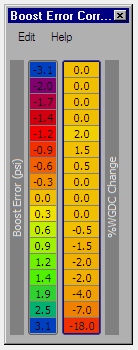
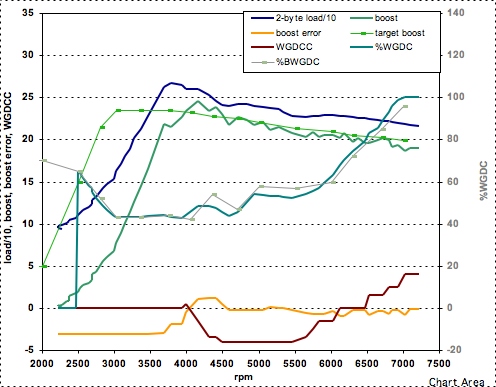
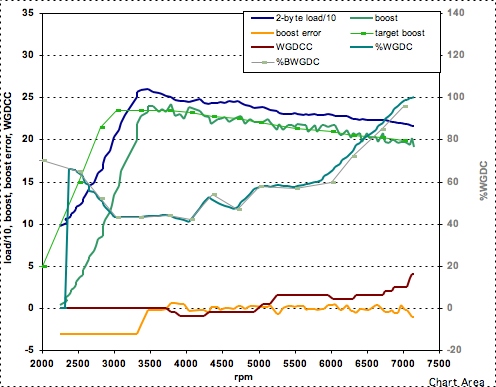
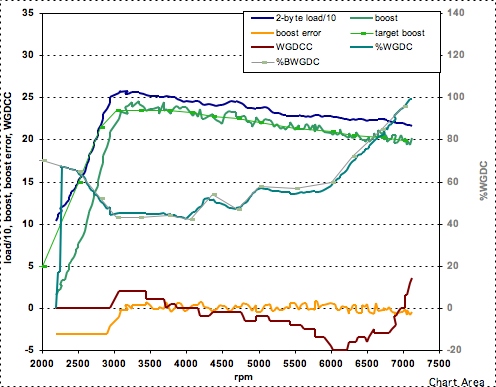
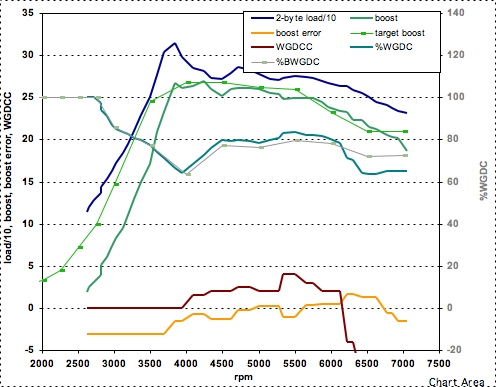
Below are results from this evenings runs. I'm now able to get almost the exact same boost in 2nd through 6th gear, and I'll get the same boost regardless of weather conditions, etc. Note that my boost curve looks almost like an MBC curve, but that is by design. Within the limits of what boost the turbo and WG can maintain, any boost curve is possible. An example of a more customized boost curve is Pd1's boost curve. Check it out below. It still needs some fine-tuning, but you can see that he's holding a nearly flat 27 psi of boost from 3500-5500 rpm, and then rapidly tapering down to about 21 psi by 6000 rpm.
2nd gear run
3rd gear run
4th gear run
Pd1's boost curve
Add the following entry to your EvoScan "Data.xml" file:
-----
<DataListItem DataLog="Y" Color="" Display="Boost Error" LogReference="BoostError" RequestID="8A" Eval="0.0241*x-3.087" Unit="psi" MetricEval="" MetricUnit="" ResponseBytes="1" GaugeMin="-5" GaugeMax="5" ChartMin="-5" ChartMax="5" ScalingFactor="1" Notes=""/>
<DataListItem DataLog="Y" Color="" Display="WGDC Correction" LogReference="WGDCCorr" RequestID="8B" Eval="0.5*x-64" Unit="WGDC%" MetricEval="" MetricUnit="" ResponseBytes="1" GaugeMin="-50" GaugeMax="50" ChartMin="-50" ChartMax="50" ScalingFactor="1" Notes=""/>
-----
Save the Data.xml file.
The New Tuning Tables
Once the ROM mods are complete, open your ROM in ECUFlash. In addition to the familiar BDEL, BCLO, and TBEC tables, there are now "Baseline Boost", "Boost Adder", and "Boost Error Correction" tables. You'll no longer be making any changes to the BDEL, BCLO, or TBEC tables. Instead all boost tuning will take place with the new tables. The values are in psi. And you will continue to use the Baseline WGDC tables as well.
This boost control system keys off of absolute pressure. Most people are used to thinking of boost in terms of gauge pressure.
Absolute pressure = gauge pressure + atmospheric pressure.
The easiest way to do the initial tuning will be to decide on your target boost levels in gauge pressure, and then add your local atmospheric pressure to those values. Then the baseline boost and boost adder must add up to those values. If you intend to keep the peak boost at or below 24.6 psi, then the easiest way to tune will be to set the Boost Adder to your local atmospheric pressure, and then set the baseline boost table to your target gauge boost pressure values. Hope that makes sense.
Here's an ideal example. If someone is living at sea level, and the desired peak boost is 24 psi, then:
- set Boost Adder = 14.7 psi
- set Baseline Boost to your boost curve.
Now a less ideal example. If someone is living at 2000 ft, then atmospheric pressure is approx 13.7 psi. If the desired peak boost as measured by your boost gauge is 27 psi, then
Baseline Boost + Boost Adder must sum to 13.7 psi + 27 psi = 40.7 psi.
The Baseline table maxes out at 24.6 psi (just like BDEL maxes out at 159.1), so for this example, one possible solution would be to set the peak value in the Baseline Boost table to 24.6 psi, and then set the Boost Adder to 40.7 - 24.6 = 16.1 psi. Hope that's a useful example. There are three Baseline Boost tables just as there are three BDEL tables, but really only table #1 needs adjusting.
Tuning Recommendations
I've been getting quite a few questions about effectively tuning the direct boost control system, so I'll describe how the boost control system works and recommend a systematic set of steps for tuning to your desired boost curve.
How the System Works
The boost control system can be thought of as consisting of two parts. The first is the baseline WGDC settings, which are called the Max WGDC tables in ECUFlash. They infact are not "max" values. After the system is tuned properly, the ECU will be able to run WGDC values that are higher or lower than the "max" WDGC table values (up to 100%). I prefer to call these tables "baseline" WGDC (BWGDC) tables because they truly are baseline values that the ECU will start with as it tries to fine-tune the boost when driving.
The second part of the system is the feedback loop. The feedback loop is designed to make small, incremental adjustments to the WGDC to maintain the desired boost. At specified intervals, it compares the actual boost to the target boost, and raises or lowers the *entire* BWGDC curve to push the boost back to the target value. The details on how this feedback system works are important to understand how to tune and interpret the data that are logged. The feedback system is a cumulative correction. The best way to explain how it works is by example.
The "WGDC change" values in the BEC table represent only *incremental* changes to the *total WGDCC*. Say for instance that you are using the following BEC table:
-3.1 0
-2.0 0
-1.4 0
-1.2 2
-1.0 2
-0.8 1.5
-0.5 1
-0.3 0.5
0 0
0.3 -0.5
0.5 -1
0.8 -1.5
1.0 -2
1.2 -3
1.9 -8
2.5 -14
3.1 -18
Now say that at some point during a WOT run, the BoostError is -1 psi. The ECU would see a value of -1 psi, and then raise the entire BWGDC curve by 2%. Now say that the ECU looks again and still sees -1 psi. The ECU would then increase the BWGDC curve by another 2%. When the ECU looks again, say it once more sees -1 psi. The ECU would raise the entire BWGDC curve by another 2%. At this point, the entire BWGDC curve has been raised by 6%. When the ECU looks again, lets say that it now sees a BoostError of 0 psi. At this point, the ECU says the boost is right on the money, so it leaves the BWGDC curve raised up by 6%. If the BoostError stays at 0 psi for the remainder of the WOT run, then the ECU will leave the curve raised up by 6% for the entire run. For example though, say at some point later in the run, the ECU sees a BoostError of +0.5 psi. It would then lower the BWGDC by -1%, so the total elevation of the curve would be +5%. If the ECU looks again and sees a BoostError of 0 psi, then it will leave the BWGDC curve at an elevation of +5%. It goes on and on like this. I think its very useful to think of it as a cummulative raising/lowering of the entire curve.
So it can be seen that the WGDCC is a cummulative term over time. Because of this, the values that go into the BEC table should be smaller as the correction interval is reduced. This is because as the correction interval becomes smaller, the ECU looks at the BoostError more often and can make many more additions and subtractions to the WGDCC. A small interval with large BEC table values will cause the boost to oscillate back and forth across the target value.
Tuning Recommendations
The key to obtaining the exact desired boost curve is to first adjust BWGDC tables without the feedback loop runing.
Step 1
Zero out the right hand side of the BEC table as shown in the figure below (figure has not yet been added). This will prevent the ECU from feedback loop from making changes to the WGDC.
Step 2
Set the BWGDC (MWGDC) tables to conservative values. Reduce all the values in your current tables by 15. This will allow you to start tuning with conservatively low boost values.
Step 3
Start tuning the BWGDC tables until the actual boost levels are as close as possible to your target boost levels. You'll need to log boost and the BoostError. You'll need to go WOT from approx 2000 rpm to 7000 rpm (or higher if you want). To tune successfully, I recommend running on the same section of road. Plan on spending an hour or so making repeated runs with BWGDC adjustments between runs. Third gear is a good gear for this tuning. Second gear is too short, and 4th gear is impractical.
Step 4
Decide on a correction interval to use. After a month of fiddling, I am getting the best results using an interval of "1" along with very small change values in the BEC table.
Step 5
Reactivate the feedback loop by inserting WGDC change values into the right side of the BEC table. The table that's currently working well for me is shown below. It will only work well if you've gone through the BWGDC tuning procedure. It should work well for most people, but you are welcome to try to fine-tune it yourself. That's what this whole forum is about, eh. :-) If you decide to make up your own BEC table, the most important thing to watch is the BoostError. This will tell you how far you are from your target boost value. The WGDCC is of secondary importance.
My current BEC table that is designed to work with a correction interval of "1"
Below are results from this evenings runs. I'm now able to get almost the exact same boost in 2nd through 6th gear, and I'll get the same boost regardless of weather conditions, etc. Note that my boost curve looks almost like an MBC curve, but that is by design. Within the limits of what boost the turbo and WG can maintain, any boost curve is possible. An example of a more customized boost curve is Pd1's boost curve. Check it out below. It still needs some fine-tuning, but you can see that he's holding a nearly flat 27 psi of boost from 3500-5500 rpm, and then rapidly tapering down to about 21 psi by 6000 rpm.
2nd gear run
3rd gear run
4th gear run
Pd1's boost curve
Last edited by mrfred; Oct 17, 2007 at 08:04 AM.
Sep 6, 2007, 11:11 PM
#4
I've tested the system thoroughly on my car, and its working well with no CELs. razorlab and TouringBubble have also tested it out prior to my release of the instructions. I'd like to thank them for taking the time to test it. I'll post up some example logs tomorrow.
Sep 6, 2007, 11:15 PM
#5

Wow that is amazing. So the normal adjustment tables are no longer available? You have revamped the code to include your own boost tables? One last thing, sorry to ask so much sounds pretty exciting, is there any difference in spoolup using the new method?
 Sep 7, 2007, 01:02 AM
#7
Evolving Member
iTrader: (2)

Join Date: Jul 2006
Location: Iceland
Posts: 165
Likes: 0
Received 0 Likes
on
0 Posts
Does this method use the JDM sensor as a reference for the boost control ?
I'm asking because EU cars dont have the MDP sensor, and I have been planning on doing some boost control with my ECU
I'm asking because EU cars dont have the MDP sensor, and I have been planning on doing some boost control with my ECU
Trending Topics
 Sep 7, 2007, 01:51 AM
#10
Evolving Member
iTrader: (2)
Join Date: Jul 2006
Location: Iceland
Posts: 165
Likes: 0
Received 0 Likes
on
0 Posts
I read that line in the first post ..
But I just wanted to make sure, because I think this is a really interesting way to control the boost.
Maybe I should have asked if mrfred knew of a way to bypass having the sensor ?
regards
Gudmundur
But I just wanted to make sure, because I think this is a really interesting way to control the boost.
Maybe I should have asked if mrfred knew of a way to bypass having the sensor ?
regards
Gudmundur

 Sep 7, 2007, 05:50 AM
#13

This method works great and I'm really glad Mrfred took the time to work this out for the community. Controlling the boost level directly is a more logical approach and will likely make boost tuning easier for many of the users here.
If you've tinkered with Mrfred's recent method load based boost control, you'll pick up on this approach quickly since it works very similar. Dialing in the correct desired boost levels and error correction/latency for your car is key.
If you have trouble with an unstable boost curve, I suggest reading through the ECU Boost Control Mods thread and try some of the fixes listed there.
Thanks again for the superb work Mrfred!
If you've tinkered with Mrfred's recent method load based boost control, you'll pick up on this approach quickly since it works very similar. Dialing in the correct desired boost levels and error correction/latency for your car is key.
If you have trouble with an unstable boost curve, I suggest reading through the ECU Boost Control Mods thread and try some of the fixes listed there.
Thanks again for the superb work Mrfred!
Sep 7, 2007, 08:04 AM
#14
Hi Folks. I just want to stress that with the exception of controlling boost rather than load, this boost control system works on the exact same principles as the stock system, so its subject to the same limitations in the range of boost adjustability and response. For example, I couldn't get more than 20 psi at 7000 rpm before I started using this system, and after setting it up, I still can't get more than 20 psi.
The changes to the ROM code are very simple. There are only a few actual changes to the ROM code. Many of the changes are just expressing existing tables with different scaling factors. The new Baseline Boost, Boost Adder, and Boost Error Correction tables are examples of this.
Instructions for other ROMs will be coming as I have time. I think that 94170008 is next as I've got that ROM pretty well commented already.
The changes to the ROM code are very simple. There are only a few actual changes to the ROM code. Many of the changes are just expressing existing tables with different scaling factors. The new Baseline Boost, Boost Adder, and Boost Error Correction tables are examples of this.
Instructions for other ROMs will be coming as I have time. I think that 94170008 is next as I've got that ROM pretty well commented already.

