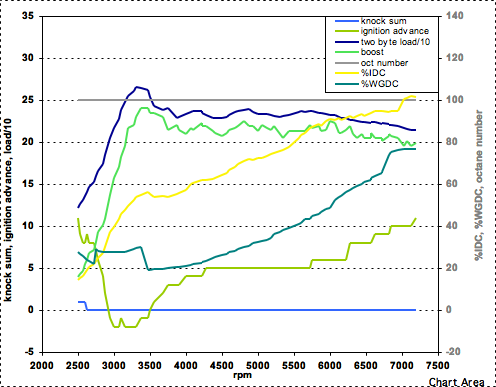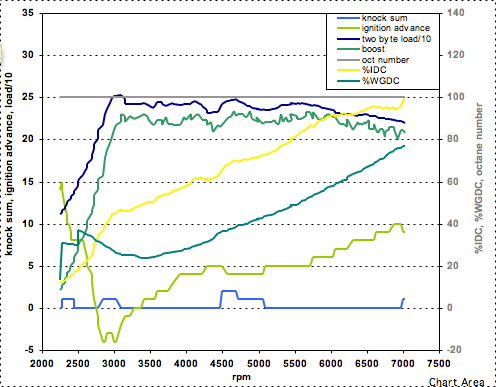


log boost with JDM MAP sensor (updated instructions)
 Mar 24, 2007, 09:06 AM
#1

log boost with JDM MAP sensor (updated instructions)
Updates
March 7, 2009: Updated info on how to purchase a JDM Evo 9 MAP sensor.
Jan 1, 2008: Updated instructions for 96420007 and 96420008 ROMs. Added some tables that need to be modified for the MAP sensor to allow the car to run.
Sept 6, 2007: The JDM MAP sensor can now be used to directly control boost.
Sept 1, 2007: Made a minor fix to the 96940011 instructions.
July 27, 2007: Significantly updated instructions have been posted. If you are using older instructions, please redo the mods with these new instructions.
Intro
USDM Evos have a 1 bar MAP sensor that can only measure up to 2.2 psi of boost. However, the JDM Evo 9 uses a 3 bar MAP sensor that can measure up to 32 psi of boost. The JDM Evo 9 sensor is identical in appearance to the USDM sensor, so it can be easily swapped for the USDM sensor. In order for the sensor to work properly with the USDM cars, a few mods must be made to some of the tables in the ROM for your car. Total time for the sensor swap should be 10 minutes or less. Mods to the ROM using ECUFlash could take up to an hour. I would like to thank bez_bashni and jcsbanks for helping me get started on this project.
Note on Disabling EGR Test
While the EGR test works properly if all the instructions are followed, I am including instructions to disable the EGR test if you like. Its one less thing the ECU has to waste time doing. It will pass emissions tests with it disabled.
ROMs currently covered (this is a USDM-only mod)
Evo 8s: 94170008, 94170014, 94170015, 96420007, 96420008, 96940011
Evo 9s: 88590013, 88590014, 88590015
To see which ROM you have, open it in ECUFlash, and expand on the "ROM Info" section. You'll see your ROM version there.
Where to get the MAP sensor
Mitsubishiparts.net sells the Evo 10 MAP sensor which is identical to the JDM Evo 9 MAP sensor. Any dealership can get it too. The part number is 1865A052.
MAP Sensor Swap
Here is a picture of the MAP sensor location (right on top of the intake manifold):

To remove the electrical plug, slide a thin blade screw driver under the metal retainer clip, and it will easily pry up. It is spring loaded, so it will go flying if you don't keep your hand on it when removing it.
After you swap in the JDM sensor, you'll need to perform some ROM mods. If the ROM mods are not done at the same time, the car will either not run or throw a CEL.
The next sections describe what mods need to be done to each of the different USDM Evo ROMs. The final section describes how to setup EvoScan or Mitsulogger to log boost.
ROM Mods for USDM Evo 9 ROMs 88590013, 88590014, 88590015
First is to add some definitions to your ECUFlash ROM XML definition file found in:
C:\Program Files\OpenECU\EcuFlash\rommetadata\mitsubishi\evo
Open the 885900XX.xml file with the text editor of your choice. Scroll down to the bottom of the file. Add the following lines just before the </rom> tag (copy everything *between* the ----):
----
<table name="MAP Scaling" category="MAPSensor" address="670c" type="2D" level="1" scaling="uint8">
<table name="MAP Output" address="800e" type="Y Axis" elements="9" scaling="Volts16"/>
</table>
<table name="MAP Fault Trig: Mid VE Max #1" category="MAPSensor" address="29d6" type="1D" level="1" scaling="Volts16"/>
<table name="MAP Fault Trig: Mid VE Min #1" category="MAPSensor" address="29b6" type="1D" level="1" scaling="Volts16"/>
<table name="MAP Fault Trig High VE #1" category="MAPSensor" address="29bc" type="1D" level="1" scaling="Volts16"/>
<table name="MAP vs Baro" category="MAPSensor" address="283c" type="1D" level="1" scaling="uint16"/>
<table name="EGR MAP Offset #1" category="MAPSensor" address="4936" type="2D" level="1" scaling="uint8">
<table name="RPM" address="74de" type="Y Axis" elements="9" scaling="RPM"/>
</table>
<table name="EGR MAP offset #2" category="MAPSensor" address="4946" type="2D" level="1" scaling="uint8">
<table name="RPM" address="74de" type="Y Axis" elements="9" scaling="RPM"/>
</table>
<table name="EGR Pressure Diff" category="MAPSensor" address="1B7C" type="1D" level="1" scaling="Volts16"/>
<table name="MAP Comparison" category="MAPSensor" address="2838" type="1D" level="1" scaling="Volts16"/>
<table name="ECU Periphery2" category="ECUPeriphery" address="fca" type="1D" level="1" scaling="Hex16"/>
<table name="ECU Periphery4" category="ECUPeriphery" address="fea" type="1D" level="1" scaling="Hex16"/>
----
After modifying and saving the ROM xml file, launch ECUFlash, open your ROM, and find the new entries. Note that they have their own category. It may be necessary to set ECUFlash to "Developer" mode in the ECUFlash options (and relaunch ECUFlash) to be able to see the tables. Here is what needs to be changed in ECUFlash:
0.84 11
1.37 20
1.89 31
2.42 40
2.95 48
3.48 57
4.00 67
4.53 80
4.98 255
Change it to the JDM values:
0.51 20
0.90 40
1.29 57
1.68 78
2.07 97
2.46 117
2.85 138
3.24 158
3.63 255
Change the "MAP Fault Trig: Mid VE Max #1" value from 4.80 to 4.90.
Change the "MAP Fault Trig: Mid VE Min #1" value from 0.20 to 0.10.
Change the "MAP Fault Trig High VE #1" value from 1.80 to 0.51.
Change the USDM "MAP vs Baro" parameter from 162 to the JDM value of 93.
The "EGR MAP Offset #1" table will read:
750 95
1000 70
1250 60
1500 51
1750 45
2000 42
2500 49
3000 50
3500 48
The "EGR MAP Offset #2" table will read:
750 97
1000 86
1250 84
1500 67
1750 52
2000 56
2500 65
3000 63
3500 60
Change *both* tables to the following values:
750 84
1000 84
1250 73
1500 65
1750 60
2000 55
2500 48
3000 43
3500 23
Change the "EGR Pressure Diff" from 0.12 to 0.04.
Change the "MAP Comparison" value from 4.00 to 1.46.
Change ECU Periphery4 parameter from F980 to B980. (Enter hex in ECUFlash by typing 0xB980.)
If you wish to disable the EGR test, change the ECU Periphery2 parameter from EFDF to EDDF. (Type 0xEDDF.)
Save the ROM file, and flash your ECU with it. That's it for the Evo 9 ROM mods. Now skip down to the end of this post to see instructions for setting up EvoScan/Mitsulogger to log boost.
ROM Mods for 2005 USDM Evo 8 ROM 96940011
First is to add some definitions to your ECUFlash ROM XML definition file found in:
C:\Program Files\OpenECU\EcuFlash\rommetadata\mitsubishi\evo
Open the 96940011.xml file with the text/XML editor of your choice. Scroll down to the bottom of the file. Add the following lines just before the </rom> tag (copy everything *between* the ----):
----
<table name="MAP Scaling" category="MAPSensor" address="57D2" type="2D" level="1" scaling="uint8">
<table name="MAP Output" address="6ED4" type="Y Axis" elements="9" scaling="Volts16"/>
</table>
<table name="MAP Fault Trig: Mid VE Max #1" category="MAPSensor" address="28B4" type="1D" level="1" scaling="Volts16"/>
<table name="MAP Fault Trig: Mid VE Min #1" category="MAPSensor" address="2894" type="1D" level="1" scaling="Volts16"/>
<table name="MAP Fault Trig High VE #1" category="MAPSensor" address="289A" type="1D" level="1" scaling="Volts16"/>
<table name="MAP vs MAF Baro" category="MAPSensor" address="2802" type="1D" level="1" scaling="uint16"/>
<table name="EGR MAP offset #1" category="MAPSensor" address="44FA" type="2D" level="1" scaling="uint8">
<table name="RPM" address="623C" type="Y Axis" elements="9" scaling="RPM"/>
</table>
<table name="EGR MAP offset #2" category="MAPSensor" address="450A" type="2D" level="1" scaling="uint8">
<table name="RPM" address="623C" type="Y Axis" elements="9" scaling="RPM"/>
</table>
<table name="EGR Pressure Diff" category="MAPSensor" address="1B68" type="1D" level="1" scaling="Volts16"/>
<table name="MAP Comparison" category="MAPSensor" address="27FE" type="1D" level="1" scaling="Volts16"/>
<table name="ECU Periphery2" category="ECUPeriphery" address="fca" type="1D" level="1" scaling="Hex16"/>
<table name="ECU Periphery4" category="ECUPeriphery" address="FEA" type="1D" level="1" scaling="Hex16"/>
----
After modifying and saving the ROM xml file, launch ECUFlash, open your ROM, and find the new entries. Note that they have their own category. It may be necessary to set ECUFlash to "Developer" mode in the ECUFlash options (and relaunch ECUFlash) to be able to see the tables. Here is what needs to be changed in ECUFlash:
0.84 11
1.37 20
1.89 31
2.42 40
2.95 48
3.48 57
4.00 67
4.53 80
4.98 255
Change it to the JDM values:
0.51 20
0.90 40
1.29 57
1.68 78
2.07 97
2.46 117
2.85 138
3.24 158
3.63 255
Change the "MAP Fault Trig: Mid VE Max #1" value from 4.80 to 4.90.
Change the "MAP Fault Trig: Mid VE Min #1" value from 0.20 to 0.10.
Change the "MAP Fault Trig High VE #1" value from 1.80 to 0.51.
Change the USDM "MAP vs Baro" parameter from 162 to the JDM value of 93.
The "EGR MAP Offset #1" table will read:
750 85
1000 75
1250 65
1500 58
1750 45
2000 49
2500 57
3000 55
3500 52
The "EGR MAP Offset #2" table will read:
750 97
1000 86
1250 84
1500 67
1750 52
2000 56
2500 65
3000 63
3500 60
Change both tables to the following values:
750 84
1000 84
1250 73
1500 65
1750 60
2000 55
2500 48
3000 43
3500 23
Change the "EGR Pressure Diff" from 0.12 to 0.04.
Change the "MAP Comparison" value from 4.00 to 1.46.
Change the ECU Periphery4 parameter from FE00 to BE00. (Enter hex in ECUFlash by typing 0xBE00.)
If you wish to disable the EGR test, change the ECU Periphery2 parameter from EFDF to EDDF. (Type 0xEDDF.)
Save the ROM file, and flash your ECU with it. That's it for the 96940011 Evo 8 ROM mods. Now skip down to the end of this post to see instructions for setting up EvoScan/Mitsulogger to log boost.
ROM Mods for 2004 USDM Evo 8 ROMs 96420007, 96420008
First is to add some definitions to your ECUFlash ROM XML definition file found in:
C:\Program Files\OpenECU\EcuFlash\rommetadata\mitsubishi\evo
Open the 96420007.xml file with the text/XML editor of your choice. Scroll down to the bottom of the file. Add the following lines just before the </rom> tag (copy everything *between* the ----):
----
<table name="MAP Test 1: Mid VE Max Voltage" category="MAPSensor" address="2048" type="1D" level="1" scaling="Volts16"/>
<table name="MAP Test 1: Mid VE Min Voltage" category="MAPSensor" address="2046" type="1D" level="1" scaling="Volts16"/>
<table name="MAP Test 2: Low VE Max Voltage" category="MAPSensor" address="204C" type="1D" level="1" scaling="Volts16"/>
<table name="MAP Test 3: High VE Min Voltage" category="MAPSensor" address="2050" type="1D" level="1" scaling="Volts16"/>
<table name="MAP Test 4: Max Minus Min" category="MAPSensor" address="2054" type="1D" level="1" scaling="Volts16"/>
<table name="EGR MAP Check 1" category="MAPSensor" address="4EEC" type="2D" level="1" scaling="uint8">
<table name="RPM" address="6D74" type="Y Axis" elements="9" scaling="RPM"/>
</table>
<table name="EGR MAP Check 2" category="MAPSensor" address="4EFC" type="2D" level="1" scaling="uint8">
<table name="RPM" address="6D74" type="Y Axis" elements="9" scaling="RPM"/>
</table>
<table name="MAP Scaling for Baro" category="MAPSensor" address="12059" type="1D" level="1" scaling="uint8"/>
<table name="EGR Pressure Diff" category="MAPSensor" address="1F62" type="1D" level="1" scaling="Volts16"/>
<table name="ECU Periphery2" category="ECUPeriphery" address="fca" type="1D" level="1" scaling="Hex16"/>
----
After modifying and saving the ROM xml file, launch ECUFlash, open your ROM, and find the new entries. Note that they have their own category. It may be necessary to set ECUFlash to "Developer" mode in the ECUFlash options (and relaunch ECUFlash) to be able to see the tables. Here is what needs to be changed in ECUFlash:
MAP Test 1: Mid VE High Voltage Test -- Change from 4.61 volts to 4.80 volts.
MAP Test 1: Mid VE Low Voltage Test -- Change from 0.10 volts to 0.06 volts.
MAP Test 3: High VE Voltage Test -- Change from 1.80 volts to 0.51 volts.
MAP Test 4: Max Minus Min -- Change from 1.80 volts to 0.51 volts.
"EGR MAP Offset #1" should read:
750 97
1000 86
1250 75
1500 67
1750 52
2000 56
2500 65
3000 63
3500 60
And "EGR MAP Offset #2" should read:
750 97
1000 86
1250 84
1500 67
1750 52
2000 56
2500 65
3000 63
3500 60
Change *both* tables to:
750 84
1000 84
1250 73
1500 65
1750 60
2000 55
2500 48
3000 43
3500 23
Change the "MAP Scaling for Baro" from 50 to 150.
Change the "EGR Pressure Diff" from 0.12 to 0.04.
If you wish to disable the EGR test, change the ECU Periphery2 parameter from EFDF to EDDF. (Type 0xEDDF.)
Save the ROM file, and flash your ECU with it. That's it for the ROM mods. Now skip down to the end of this post to see instructions for setting up EvoScan/Mitsulogger to log boost.
ROM Mods for 2004 USDM Evo 8 ROMs 94170014, 94170015
First is to add some definitions to your ECUFlash ROM XML definition file found in:
C:\Program Files\OpenECU\EcuFlash\rommetadata\mitsubishi\evo
Open the 94170014.xml or 94170015.xml file with the text/XML editor of your choice. Scroll down to the bottom of the file. Add the following lines just before the </rom> tag (copy everything *between* the ----):
----
<table name="MAP Test 1: Mid VE Max Voltage" category="MAPSensor" address="2048" type="1D" level="1" scaling="Volts16"/>
<table name="MAP Test 1: Mid VE Min Voltage" category="MAPSensor" address="2046" type="1D" level="1" scaling="Volts16"/>
<table name="MAP Test 2: Low VE Max Voltage" category="MAPSensor" address="204C" type="1D" level="1" scaling="Volts16"/>
<table name="MAP Test 3: High VE Min Voltage" category="MAPSensor" address="2050" type="1D" level="1" scaling="Volts16"/>
<table name="EGR MAP Check 1" category="MAPSensor" address="4DE4" type="2D" level="1" scaling="uint8">
<table name="RPM" address="6C0A" type="Y Axis" elements="9" scaling="RPM"/>
</table>
<table name="EGR MAP Check 2" category="MAPSensor" address="4DF4" type="2D" level="1" scaling="uint8">
<table name="RPM" address="6C0A" type="Y Axis" elements="9" scaling="RPM"/>
</table>
<table name="EGR Pressure Diff" category="MAPSensor" address="1F62" type="1D" level="1" scaling="Volts16"/>
<table name="ECU Periphery2" category="ECUPeriphery" address="fca" type="1D" level="1" scaling="Hex16"/>
----
After modifying and saving the ROM xml file, launch ECUFlash, open your ROM, and find the new entries. Note that they have their own category. It may be necessary to set ECUFlash to "Developer" mode in the ECUFlash options (and relaunch ECUFlash) to be able to see the tables. Here is what needs to be changed in ECUFlash:
MAP Test 1: Mid VE High Voltage Test -- Change from 4.61 volts to 4.80 volts.
MAP Test 1: Mid VE Low Voltage Test -- Change from 0.10 volts to 0.06 volts.
MAP Test 3: High VE Voltage Test -- Change from 1.8 volts to 0.5 volts.
"EGR MAP Offset #1" should read:
750 97
1000 86
1250 75
1500 67
1750 52
2000 56
2500 65
3000 63
3500 60
And "EGR MAP Offset #2" should read:
750 97
1000 86
1250 84
1500 67
1750 52
2000 56
2500 65
3000 63
3500 60
Change *both* tables to:
750 84
1000 84
1250 73
1500 65
1750 60
2000 55
2500 48
3000 43
3500 23
Change the "EGR Pressure Diff" from 0.12 to 0.04.
If you wish to disable the EGR test, change the ECU Periphery2 parameter from EFDF to EDDF. (Type 0xEDDF.)
Save the ROM file, and flash your ECU with it. That's it for the ROM mods. Now skip down to the end of this post to see instructions for setting up EvoScan/Mitsulogger to log boost.
ROM Mods for 2003 USDM Evo 8 ROM 94170008
First is to add some definitions to your ECUFlash ROM XML definition file found in:
C:\Program Files\OpenECU\EcuFlash\rommetadata\mitsubishi\evo
Open the 94170008.xml file with the text/XML editor of your choice. Scroll down to the bottom of the file. Add the following lines just before the </rom> tag (copy everything *between* the ----):
----
<table name="MAP Test 1: Mid VE Max Voltage" category="MAPSensor" address="2048" type="1D" level="1" scaling="Volts16"/>
<table name="MAP Test 1: Mid VE Min Voltage" category="MAPSensor" address="2046" type="1D" level="1" scaling="Volts16"/>
<table name="MAP Test 2: Low VE Max Voltage" category="MAPSensor" address="204C" type="1D" level="1" scaling="Volts16"/>
<table name="MAP Test 3: High VE Min Voltage" category="MAPSensor" address="2050" type="1D" level="1" scaling="Volts16"/>
<table name="EGR MAP Offset #1" category="MAPSensor" address="4DE4" type="2D" level="1" scaling="uint8">
<table name="RPM" address="69B6" type="Y Axis" elements="9" scaling="RPM"/>
</table>
<table name="EGR MAP Offset #2" category="MAPSensor" address="4DF4" type="2D" level="1" scaling="uint8">
<table name="RPM" address="69B6" type="Y Axis" elements="9" scaling="RPM"/>
</table>
<table name="EGR Pressure Diff" category="MAPSensor" address="1F62" type="1D" level="1" scaling="Volts16"/>
<table name="ECU Periphery2" category="ECUPeriphery" address="fca" type="1D" level="1" scaling="Hex16"/>
----
After modifying and saving the ROM xml file, launch ECUFlash, open your ROM, and find the new entries. Note that they have their own category. It may be necessary to set ECUFlash to "Developer" mode in the ECUFlash options (and relaunch ECUFlash) to be able to see the tables. Here is what needs to be changed in ECUFlash:
MAP Test 1: Mid VE High Voltage Test -- Change from 4.61 volts to 4.90 volts.
MAP Test 1: Mid VE Low Voltage Test -- Change from 0.10 volts to 0.06 volts.
MAP Test 3: High VE Voltage Test -- Change from 1.80 volts to 0.51 volts.
"EGR MAP Offset #1" should read:
750 97
1000 86
1250 75
1500 67
1750 52
2000 56
2500 65
3000 63
3500 60
And "EGR MAP Offset #2" should read:
750 97
1000 86
1250 84
1500 67
1750 52
2000 56
2500 65
3000 63
3500 60
Change *both* tables to:
750 84
1000 84
1250 73
1500 65
1750 60
2000 55
2500 48
3000 43
3500 23
Change the "EGR Pressure Diff" from 0.12 to 0.04.
If you wish to disable the EGR test, change the ECU Periphery2 parameter from EFDF to EDDF. (Type 0xEDDF.)
Save the ROM file, and flash your ECU with it. That's it for the ROM mods. Now skip down to the end of this post to see instructions for setting up EvoScan/Mitsulogger to log boost.
Logging Boost in EvoScan/Mitsulogger
MAP sensors do not know the local atmospheric pressure. To log boost in psig (what all boost gauges show and what people always use to discuss boost values), the conversion formula for the logging program needs to have an offset for your local atmospheric pressure. The general formula for the JDM Evo 9 MAP sensor is:
0.19347*x-b
where b is the local atmospheric pressure. The local atmospheric pressure is affected strongly affected by altitude. For example the pressure at sea level is 14.7 psi, but at 5000 ft, the pressure is 12.2 psi. That's a big difference when you want to log boost. Use this table of altitude vs pressure to determine the offset pressure for your formula:
altitude (ft) local atmospheric pressure (psi)
0 14.7
500 14.4
1000 14.2
1500 13.9
2000 13.7
2500 13.4
3000 13.2
3500 12.9
4000 12.7
4500 12.5
5000 12.2
6000 11.8
7000 11.3
8000 10.9
*For example*, if you are living at 750 ft, then you'd want to use 14.3 psi as your offset, and the formula would be
0.19347*x-14.3
In the following instructions, please use your formula in place of the words FORMULA HERE.
For EvoScan 0.99+, the MAP logging definition in the Data.xml file should be changed to:
<DataListItem DataLog="Y" Color="" Display="JDM MAP" LogReference="JDMMAP" RequestID="38" Eval="FORMULA HERE" Unit="psig" MetricEval="" MetricUnit="" ResponseBytes="1" GaugeMin="-15" GaugeMax="35" ChartMin="-15" ChartMax="35" ScalingFactor="1" Notes=""/>
To log boost in psi in Mitsulogger, the MAP logging definition should be changed to:
<Request LogReference="JDMMAP" RequestID="38" Eval="FORMULA HERE" Unit="psig" Logged="y" Response="2"/>
March 7, 2009: Updated info on how to purchase a JDM Evo 9 MAP sensor.
Jan 1, 2008: Updated instructions for 96420007 and 96420008 ROMs. Added some tables that need to be modified for the MAP sensor to allow the car to run.
Sept 6, 2007: The JDM MAP sensor can now be used to directly control boost.
Sept 1, 2007: Made a minor fix to the 96940011 instructions.
July 27, 2007: Significantly updated instructions have been posted. If you are using older instructions, please redo the mods with these new instructions.
Intro
USDM Evos have a 1 bar MAP sensor that can only measure up to 2.2 psi of boost. However, the JDM Evo 9 uses a 3 bar MAP sensor that can measure up to 32 psi of boost. The JDM Evo 9 sensor is identical in appearance to the USDM sensor, so it can be easily swapped for the USDM sensor. In order for the sensor to work properly with the USDM cars, a few mods must be made to some of the tables in the ROM for your car. Total time for the sensor swap should be 10 minutes or less. Mods to the ROM using ECUFlash could take up to an hour. I would like to thank bez_bashni and jcsbanks for helping me get started on this project.
Note on Disabling EGR Test
While the EGR test works properly if all the instructions are followed, I am including instructions to disable the EGR test if you like. Its one less thing the ECU has to waste time doing. It will pass emissions tests with it disabled.
ROMs currently covered (this is a USDM-only mod)
Evo 8s: 94170008, 94170014, 94170015, 96420007, 96420008, 96940011
Evo 9s: 88590013, 88590014, 88590015
To see which ROM you have, open it in ECUFlash, and expand on the "ROM Info" section. You'll see your ROM version there.
Where to get the MAP sensor
Mitsubishiparts.net sells the Evo 10 MAP sensor which is identical to the JDM Evo 9 MAP sensor. Any dealership can get it too. The part number is 1865A052.
MAP Sensor Swap
Here is a picture of the MAP sensor location (right on top of the intake manifold):
To remove the electrical plug, slide a thin blade screw driver under the metal retainer clip, and it will easily pry up. It is spring loaded, so it will go flying if you don't keep your hand on it when removing it.
After you swap in the JDM sensor, you'll need to perform some ROM mods. If the ROM mods are not done at the same time, the car will either not run or throw a CEL.
The next sections describe what mods need to be done to each of the different USDM Evo ROMs. The final section describes how to setup EvoScan or Mitsulogger to log boost.
ROM Mods for USDM Evo 9 ROMs 88590013, 88590014, 88590015
First is to add some definitions to your ECUFlash ROM XML definition file found in:
C:\Program Files\OpenECU\EcuFlash\rommetadata\mitsubishi\evo
Open the 885900XX.xml file with the text editor of your choice. Scroll down to the bottom of the file. Add the following lines just before the </rom> tag (copy everything *between* the ----):
----
<table name="MAP Scaling" category="MAPSensor" address="670c" type="2D" level="1" scaling="uint8">
<table name="MAP Output" address="800e" type="Y Axis" elements="9" scaling="Volts16"/>
</table>
<table name="MAP Fault Trig: Mid VE Max #1" category="MAPSensor" address="29d6" type="1D" level="1" scaling="Volts16"/>
<table name="MAP Fault Trig: Mid VE Min #1" category="MAPSensor" address="29b6" type="1D" level="1" scaling="Volts16"/>
<table name="MAP Fault Trig High VE #1" category="MAPSensor" address="29bc" type="1D" level="1" scaling="Volts16"/>
<table name="MAP vs Baro" category="MAPSensor" address="283c" type="1D" level="1" scaling="uint16"/>
<table name="EGR MAP Offset #1" category="MAPSensor" address="4936" type="2D" level="1" scaling="uint8">
<table name="RPM" address="74de" type="Y Axis" elements="9" scaling="RPM"/>
</table>
<table name="EGR MAP offset #2" category="MAPSensor" address="4946" type="2D" level="1" scaling="uint8">
<table name="RPM" address="74de" type="Y Axis" elements="9" scaling="RPM"/>
</table>
<table name="EGR Pressure Diff" category="MAPSensor" address="1B7C" type="1D" level="1" scaling="Volts16"/>
<table name="MAP Comparison" category="MAPSensor" address="2838" type="1D" level="1" scaling="Volts16"/>
<table name="ECU Periphery2" category="ECUPeriphery" address="fca" type="1D" level="1" scaling="Hex16"/>
<table name="ECU Periphery4" category="ECUPeriphery" address="fea" type="1D" level="1" scaling="Hex16"/>
----
After modifying and saving the ROM xml file, launch ECUFlash, open your ROM, and find the new entries. Note that they have their own category. It may be necessary to set ECUFlash to "Developer" mode in the ECUFlash options (and relaunch ECUFlash) to be able to see the tables. Here is what needs to be changed in ECUFlash:
0.84 11
1.37 20
1.89 31
2.42 40
2.95 48
3.48 57
4.00 67
4.53 80
4.98 255
Change it to the JDM values:
0.51 20
0.90 40
1.29 57
1.68 78
2.07 97
2.46 117
2.85 138
3.24 158
3.63 255
Change the "MAP Fault Trig: Mid VE Max #1" value from 4.80 to 4.90.
Change the "MAP Fault Trig: Mid VE Min #1" value from 0.20 to 0.10.
Change the "MAP Fault Trig High VE #1" value from 1.80 to 0.51.
Change the USDM "MAP vs Baro" parameter from 162 to the JDM value of 93.
The "EGR MAP Offset #1" table will read:
750 95
1000 70
1250 60
1500 51
1750 45
2000 42
2500 49
3000 50
3500 48
The "EGR MAP Offset #2" table will read:
750 97
1000 86
1250 84
1500 67
1750 52
2000 56
2500 65
3000 63
3500 60
Change *both* tables to the following values:
750 84
1000 84
1250 73
1500 65
1750 60
2000 55
2500 48
3000 43
3500 23
Change the "EGR Pressure Diff" from 0.12 to 0.04.
Change the "MAP Comparison" value from 4.00 to 1.46.
Change ECU Periphery4 parameter from F980 to B980. (Enter hex in ECUFlash by typing 0xB980.)
If you wish to disable the EGR test, change the ECU Periphery2 parameter from EFDF to EDDF. (Type 0xEDDF.)
Save the ROM file, and flash your ECU with it. That's it for the Evo 9 ROM mods. Now skip down to the end of this post to see instructions for setting up EvoScan/Mitsulogger to log boost.
ROM Mods for 2005 USDM Evo 8 ROM 96940011
First is to add some definitions to your ECUFlash ROM XML definition file found in:
C:\Program Files\OpenECU\EcuFlash\rommetadata\mitsubishi\evo
Open the 96940011.xml file with the text/XML editor of your choice. Scroll down to the bottom of the file. Add the following lines just before the </rom> tag (copy everything *between* the ----):
----
<table name="MAP Scaling" category="MAPSensor" address="57D2" type="2D" level="1" scaling="uint8">
<table name="MAP Output" address="6ED4" type="Y Axis" elements="9" scaling="Volts16"/>
</table>
<table name="MAP Fault Trig: Mid VE Max #1" category="MAPSensor" address="28B4" type="1D" level="1" scaling="Volts16"/>
<table name="MAP Fault Trig: Mid VE Min #1" category="MAPSensor" address="2894" type="1D" level="1" scaling="Volts16"/>
<table name="MAP Fault Trig High VE #1" category="MAPSensor" address="289A" type="1D" level="1" scaling="Volts16"/>
<table name="MAP vs MAF Baro" category="MAPSensor" address="2802" type="1D" level="1" scaling="uint16"/>
<table name="EGR MAP offset #1" category="MAPSensor" address="44FA" type="2D" level="1" scaling="uint8">
<table name="RPM" address="623C" type="Y Axis" elements="9" scaling="RPM"/>
</table>
<table name="EGR MAP offset #2" category="MAPSensor" address="450A" type="2D" level="1" scaling="uint8">
<table name="RPM" address="623C" type="Y Axis" elements="9" scaling="RPM"/>
</table>
<table name="EGR Pressure Diff" category="MAPSensor" address="1B68" type="1D" level="1" scaling="Volts16"/>
<table name="MAP Comparison" category="MAPSensor" address="27FE" type="1D" level="1" scaling="Volts16"/>
<table name="ECU Periphery2" category="ECUPeriphery" address="fca" type="1D" level="1" scaling="Hex16"/>
<table name="ECU Periphery4" category="ECUPeriphery" address="FEA" type="1D" level="1" scaling="Hex16"/>
----
After modifying and saving the ROM xml file, launch ECUFlash, open your ROM, and find the new entries. Note that they have their own category. It may be necessary to set ECUFlash to "Developer" mode in the ECUFlash options (and relaunch ECUFlash) to be able to see the tables. Here is what needs to be changed in ECUFlash:
0.84 11
1.37 20
1.89 31
2.42 40
2.95 48
3.48 57
4.00 67
4.53 80
4.98 255
Change it to the JDM values:
0.51 20
0.90 40
1.29 57
1.68 78
2.07 97
2.46 117
2.85 138
3.24 158
3.63 255
Change the "MAP Fault Trig: Mid VE Max #1" value from 4.80 to 4.90.
Change the "MAP Fault Trig: Mid VE Min #1" value from 0.20 to 0.10.
Change the "MAP Fault Trig High VE #1" value from 1.80 to 0.51.
Change the USDM "MAP vs Baro" parameter from 162 to the JDM value of 93.
The "EGR MAP Offset #1" table will read:
750 85
1000 75
1250 65
1500 58
1750 45
2000 49
2500 57
3000 55
3500 52
The "EGR MAP Offset #2" table will read:
750 97
1000 86
1250 84
1500 67
1750 52
2000 56
2500 65
3000 63
3500 60
Change both tables to the following values:
750 84
1000 84
1250 73
1500 65
1750 60
2000 55
2500 48
3000 43
3500 23
Change the "EGR Pressure Diff" from 0.12 to 0.04.
Change the "MAP Comparison" value from 4.00 to 1.46.
Change the ECU Periphery4 parameter from FE00 to BE00. (Enter hex in ECUFlash by typing 0xBE00.)
If you wish to disable the EGR test, change the ECU Periphery2 parameter from EFDF to EDDF. (Type 0xEDDF.)
Save the ROM file, and flash your ECU with it. That's it for the 96940011 Evo 8 ROM mods. Now skip down to the end of this post to see instructions for setting up EvoScan/Mitsulogger to log boost.
ROM Mods for 2004 USDM Evo 8 ROMs 96420007, 96420008
First is to add some definitions to your ECUFlash ROM XML definition file found in:
C:\Program Files\OpenECU\EcuFlash\rommetadata\mitsubishi\evo
Open the 96420007.xml file with the text/XML editor of your choice. Scroll down to the bottom of the file. Add the following lines just before the </rom> tag (copy everything *between* the ----):
----
<table name="MAP Test 1: Mid VE Max Voltage" category="MAPSensor" address="2048" type="1D" level="1" scaling="Volts16"/>
<table name="MAP Test 1: Mid VE Min Voltage" category="MAPSensor" address="2046" type="1D" level="1" scaling="Volts16"/>
<table name="MAP Test 2: Low VE Max Voltage" category="MAPSensor" address="204C" type="1D" level="1" scaling="Volts16"/>
<table name="MAP Test 3: High VE Min Voltage" category="MAPSensor" address="2050" type="1D" level="1" scaling="Volts16"/>
<table name="MAP Test 4: Max Minus Min" category="MAPSensor" address="2054" type="1D" level="1" scaling="Volts16"/>
<table name="EGR MAP Check 1" category="MAPSensor" address="4EEC" type="2D" level="1" scaling="uint8">
<table name="RPM" address="6D74" type="Y Axis" elements="9" scaling="RPM"/>
</table>
<table name="EGR MAP Check 2" category="MAPSensor" address="4EFC" type="2D" level="1" scaling="uint8">
<table name="RPM" address="6D74" type="Y Axis" elements="9" scaling="RPM"/>
</table>
<table name="MAP Scaling for Baro" category="MAPSensor" address="12059" type="1D" level="1" scaling="uint8"/>
<table name="EGR Pressure Diff" category="MAPSensor" address="1F62" type="1D" level="1" scaling="Volts16"/>
<table name="ECU Periphery2" category="ECUPeriphery" address="fca" type="1D" level="1" scaling="Hex16"/>
----
After modifying and saving the ROM xml file, launch ECUFlash, open your ROM, and find the new entries. Note that they have their own category. It may be necessary to set ECUFlash to "Developer" mode in the ECUFlash options (and relaunch ECUFlash) to be able to see the tables. Here is what needs to be changed in ECUFlash:
MAP Test 1: Mid VE High Voltage Test -- Change from 4.61 volts to 4.80 volts.
MAP Test 1: Mid VE Low Voltage Test -- Change from 0.10 volts to 0.06 volts.
MAP Test 3: High VE Voltage Test -- Change from 1.80 volts to 0.51 volts.
MAP Test 4: Max Minus Min -- Change from 1.80 volts to 0.51 volts.
"EGR MAP Offset #1" should read:
750 97
1000 86
1250 75
1500 67
1750 52
2000 56
2500 65
3000 63
3500 60
And "EGR MAP Offset #2" should read:
750 97
1000 86
1250 84
1500 67
1750 52
2000 56
2500 65
3000 63
3500 60
Change *both* tables to:
750 84
1000 84
1250 73
1500 65
1750 60
2000 55
2500 48
3000 43
3500 23
Change the "MAP Scaling for Baro" from 50 to 150.
Change the "EGR Pressure Diff" from 0.12 to 0.04.
If you wish to disable the EGR test, change the ECU Periphery2 parameter from EFDF to EDDF. (Type 0xEDDF.)
Save the ROM file, and flash your ECU with it. That's it for the ROM mods. Now skip down to the end of this post to see instructions for setting up EvoScan/Mitsulogger to log boost.
ROM Mods for 2004 USDM Evo 8 ROMs 94170014, 94170015
First is to add some definitions to your ECUFlash ROM XML definition file found in:
C:\Program Files\OpenECU\EcuFlash\rommetadata\mitsubishi\evo
Open the 94170014.xml or 94170015.xml file with the text/XML editor of your choice. Scroll down to the bottom of the file. Add the following lines just before the </rom> tag (copy everything *between* the ----):
----
<table name="MAP Test 1: Mid VE Max Voltage" category="MAPSensor" address="2048" type="1D" level="1" scaling="Volts16"/>
<table name="MAP Test 1: Mid VE Min Voltage" category="MAPSensor" address="2046" type="1D" level="1" scaling="Volts16"/>
<table name="MAP Test 2: Low VE Max Voltage" category="MAPSensor" address="204C" type="1D" level="1" scaling="Volts16"/>
<table name="MAP Test 3: High VE Min Voltage" category="MAPSensor" address="2050" type="1D" level="1" scaling="Volts16"/>
<table name="EGR MAP Check 1" category="MAPSensor" address="4DE4" type="2D" level="1" scaling="uint8">
<table name="RPM" address="6C0A" type="Y Axis" elements="9" scaling="RPM"/>
</table>
<table name="EGR MAP Check 2" category="MAPSensor" address="4DF4" type="2D" level="1" scaling="uint8">
<table name="RPM" address="6C0A" type="Y Axis" elements="9" scaling="RPM"/>
</table>
<table name="EGR Pressure Diff" category="MAPSensor" address="1F62" type="1D" level="1" scaling="Volts16"/>
<table name="ECU Periphery2" category="ECUPeriphery" address="fca" type="1D" level="1" scaling="Hex16"/>
----
After modifying and saving the ROM xml file, launch ECUFlash, open your ROM, and find the new entries. Note that they have their own category. It may be necessary to set ECUFlash to "Developer" mode in the ECUFlash options (and relaunch ECUFlash) to be able to see the tables. Here is what needs to be changed in ECUFlash:
MAP Test 1: Mid VE High Voltage Test -- Change from 4.61 volts to 4.80 volts.
MAP Test 1: Mid VE Low Voltage Test -- Change from 0.10 volts to 0.06 volts.
MAP Test 3: High VE Voltage Test -- Change from 1.8 volts to 0.5 volts.
"EGR MAP Offset #1" should read:
750 97
1000 86
1250 75
1500 67
1750 52
2000 56
2500 65
3000 63
3500 60
And "EGR MAP Offset #2" should read:
750 97
1000 86
1250 84
1500 67
1750 52
2000 56
2500 65
3000 63
3500 60
Change *both* tables to:
750 84
1000 84
1250 73
1500 65
1750 60
2000 55
2500 48
3000 43
3500 23
Change the "EGR Pressure Diff" from 0.12 to 0.04.
If you wish to disable the EGR test, change the ECU Periphery2 parameter from EFDF to EDDF. (Type 0xEDDF.)
Save the ROM file, and flash your ECU with it. That's it for the ROM mods. Now skip down to the end of this post to see instructions for setting up EvoScan/Mitsulogger to log boost.
ROM Mods for 2003 USDM Evo 8 ROM 94170008
First is to add some definitions to your ECUFlash ROM XML definition file found in:
C:\Program Files\OpenECU\EcuFlash\rommetadata\mitsubishi\evo
Open the 94170008.xml file with the text/XML editor of your choice. Scroll down to the bottom of the file. Add the following lines just before the </rom> tag (copy everything *between* the ----):
----
<table name="MAP Test 1: Mid VE Max Voltage" category="MAPSensor" address="2048" type="1D" level="1" scaling="Volts16"/>
<table name="MAP Test 1: Mid VE Min Voltage" category="MAPSensor" address="2046" type="1D" level="1" scaling="Volts16"/>
<table name="MAP Test 2: Low VE Max Voltage" category="MAPSensor" address="204C" type="1D" level="1" scaling="Volts16"/>
<table name="MAP Test 3: High VE Min Voltage" category="MAPSensor" address="2050" type="1D" level="1" scaling="Volts16"/>
<table name="EGR MAP Offset #1" category="MAPSensor" address="4DE4" type="2D" level="1" scaling="uint8">
<table name="RPM" address="69B6" type="Y Axis" elements="9" scaling="RPM"/>
</table>
<table name="EGR MAP Offset #2" category="MAPSensor" address="4DF4" type="2D" level="1" scaling="uint8">
<table name="RPM" address="69B6" type="Y Axis" elements="9" scaling="RPM"/>
</table>
<table name="EGR Pressure Diff" category="MAPSensor" address="1F62" type="1D" level="1" scaling="Volts16"/>
<table name="ECU Periphery2" category="ECUPeriphery" address="fca" type="1D" level="1" scaling="Hex16"/>
----
After modifying and saving the ROM xml file, launch ECUFlash, open your ROM, and find the new entries. Note that they have their own category. It may be necessary to set ECUFlash to "Developer" mode in the ECUFlash options (and relaunch ECUFlash) to be able to see the tables. Here is what needs to be changed in ECUFlash:
MAP Test 1: Mid VE High Voltage Test -- Change from 4.61 volts to 4.90 volts.
MAP Test 1: Mid VE Low Voltage Test -- Change from 0.10 volts to 0.06 volts.
MAP Test 3: High VE Voltage Test -- Change from 1.80 volts to 0.51 volts.
"EGR MAP Offset #1" should read:
750 97
1000 86
1250 75
1500 67
1750 52
2000 56
2500 65
3000 63
3500 60
And "EGR MAP Offset #2" should read:
750 97
1000 86
1250 84
1500 67
1750 52
2000 56
2500 65
3000 63
3500 60
Change *both* tables to:
750 84
1000 84
1250 73
1500 65
1750 60
2000 55
2500 48
3000 43
3500 23
Change the "EGR Pressure Diff" from 0.12 to 0.04.
If you wish to disable the EGR test, change the ECU Periphery2 parameter from EFDF to EDDF. (Type 0xEDDF.)
Save the ROM file, and flash your ECU with it. That's it for the ROM mods. Now skip down to the end of this post to see instructions for setting up EvoScan/Mitsulogger to log boost.
Logging Boost in EvoScan/Mitsulogger
MAP sensors do not know the local atmospheric pressure. To log boost in psig (what all boost gauges show and what people always use to discuss boost values), the conversion formula for the logging program needs to have an offset for your local atmospheric pressure. The general formula for the JDM Evo 9 MAP sensor is:
0.19347*x-b
where b is the local atmospheric pressure. The local atmospheric pressure is affected strongly affected by altitude. For example the pressure at sea level is 14.7 psi, but at 5000 ft, the pressure is 12.2 psi. That's a big difference when you want to log boost. Use this table of altitude vs pressure to determine the offset pressure for your formula:
altitude (ft) local atmospheric pressure (psi)
0 14.7
500 14.4
1000 14.2
1500 13.9
2000 13.7
2500 13.4
3000 13.2
3500 12.9
4000 12.7
4500 12.5
5000 12.2
6000 11.8
7000 11.3
8000 10.9
*For example*, if you are living at 750 ft, then you'd want to use 14.3 psi as your offset, and the formula would be
0.19347*x-14.3
In the following instructions, please use your formula in place of the words FORMULA HERE.
For EvoScan 0.99+, the MAP logging definition in the Data.xml file should be changed to:
<DataListItem DataLog="Y" Color="" Display="JDM MAP" LogReference="JDMMAP" RequestID="38" Eval="FORMULA HERE" Unit="psig" MetricEval="" MetricUnit="" ResponseBytes="1" GaugeMin="-15" GaugeMax="35" ChartMin="-15" ChartMax="35" ScalingFactor="1" Notes=""/>
To log boost in psi in Mitsulogger, the MAP logging definition should be changed to:
<Request LogReference="JDMMAP" RequestID="38" Eval="FORMULA HERE" Unit="psig" Logged="y" Response="2"/>
Last edited by mrfred; Sep 20, 2009 at 07:20 AM.




 good job.